


Connect your stack to Slate

Webflow
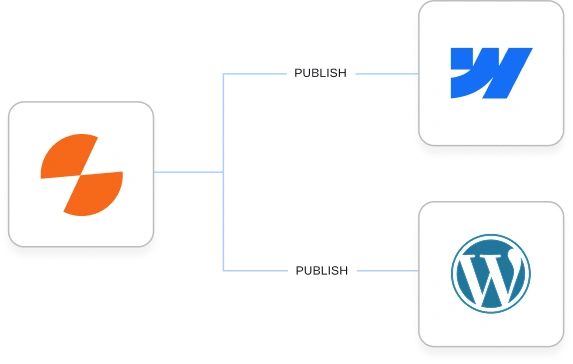
Publish AI-generated content directly to your Webflow CMS collections - create new pages, update existing items, and map workflow data to any field. Draft or live, at scale.

WordPress
Create and update posts on your WordPress site directly from Slate workflows. Set publish status, map fields, upload featured images, and push at scale.

Sanity
Push content and any changes from Slate straight into your Sanity datasets. Create new documents or update existing ones, map outputs to any field, and publish live or hold as drafts.

Slack
Mention @Slate in any Slack channel and operate it directly from there. Ask questions of your workspace data, run workflows, approve runs, and get results and notifications back in the thread.

Google Analytics (GA4)
Bring GA4 traffic and engagement data into Slate. Sessions, users, engagement time, and channel data feed into the Pages view alongside GSC and AI citation metrics.

Google Search Console
Pull your organic search performance data into Slate - clicks, impressions, CTR, and position per page, combined with GA4 and AI citation data in a single view.
Google Ads
Pull keyword performance, ad copy data, and campaign metrics into Slate workflows. Map what's converting in paid search directly into your organic and AI content strategy.

Semrush
Pull live SEO data from Semrush directly into any workflow step. Keyword overview, domain overview, related keywords, organic rankings, backlink profiles.

Ahrefs
Pull live SEO data from Ahrefs directly into any workflow step. Site explorer, keyword research, content explorer, rank tracking, backlink analysis.

HeyReach
Run LinkedIn campaigns through your connected HeyReach account. Pull recipients from missing mentions or a CSV, personalize every message with workflow data, and track open rates and replies in Slate's inbox.

YouTube
Pull video metadata, transcripts, and performance data into Slate workflows. Repurpose video content into written formats or use high-performing video topics to inform your content strategy.

Surface what your audience actually cares about. Pull thread data, top posts, and community discussions from Reddit into Slate workflows to inform angle selection, FAQs, and content gaps.

HubSpot
Connect your CRM data to Slate workflows. Pull contact properties, deal stages, and customer segments to inform content targeting - or push workflow outputs directly into HubSpot records.

ClickUp
Trigger Slate workflows from ClickUp tasks, or push workflow outputs back as task updates. Keep your content production pipeline and project management in the same loop.

Google Sheets
Read data from and write results back to Google Sheets within any Slate workflow. Use spreadsheets as workflow inputs, outputs, or both.

OpenAI
Access GPT for text generation and OpenAI's image models for visual content - all within Slate workflows. Switch models without rebuilding your pipeline.

Anthropic Claude
Access Claude directly in Slate workflows for generation, analysis, and reasoning tasks. Also available as the MCP client that connects your full Slate workspace to Claude.

Google Gemini
Run Google Gemini models in Slate workflows for text generation, multimodal tasks, and large-context operations. Available alongside other frontier models.

Perplexity
Use Perplexity's search-grounded models in Slate workflows when outputs need real-time web context. Pairs well with content that has to reflect what's happening now, not just what was true at training time.
Claude MCP Connector
Connect Slate to Claude via the Model Context Protocol. Query your AI analytics, trigger workflows, manage sheets, and update Brand Kit - all through natural language in Claude.

Brand Kit
Structured, versioned brand identity - product lines, audiences, regions, content types, voice, and writing rules; that every workflow reads automatically. MCP-accessible from Claude.

Knowledge Bases
Semantic search over your documents, case studies, support content, and research. Workflows surface the right material automatically.

Files
Upload reference documents, datasets, and supplementary material that feed directly into specific workflow steps. No full indexing required - just upload and reference.
Missing an integration your team relies on? Tell us.
25 LLM models live on
Slate today. More every week.
Slate picks the right model for each step in your workflow. You write the brief and review the output - what runs in between is handled for you.
Frontier models, always current
Every new frontier model goes live in Slate within 24 hours of release. Your workflows get better as the models do - without any changes on your end.
The right model for each task
Slate assigns models based on what each workflow step needs - a fast model for classification, a reasoning model for the content that matters.
Any input type, no prep needed
Feed in text, images, video, audio, or documents directly. Slate handles the format at every step.

On-brand images, inline
Generate visuals with OpenAI and Gemini inside the same workflow that produces your content. No context switch to a separate tool.
The context layer behind every output Slate produces
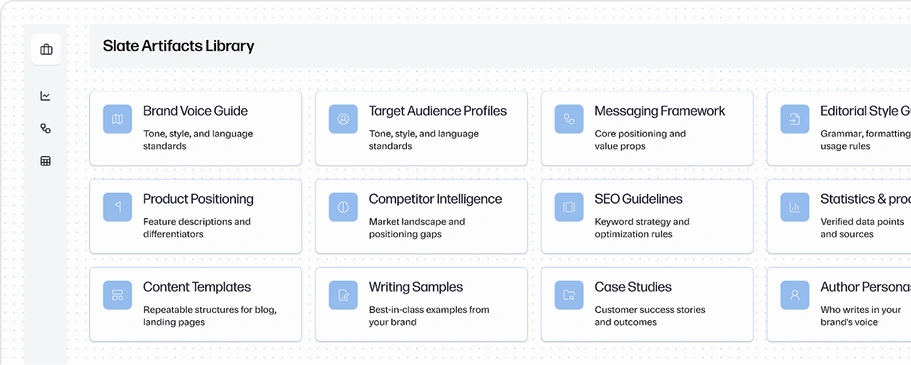
Every workflow Slate runs reads from your brand context automatically. Your voice, your positioning, your supporting evidence - structured once, applied everywhere.


Brand Kit
Define your brand identity once - voice, tone, audiences, product lines, and writing rules, and every Slate workflow reads the relevant piece automatically. The right context for each task, not everything at once.


Knowledge Bases
Upload your case studies, product docs, research, and internal content. Slate retrieves what's relevant by meaning - so every workflow starts with the supporting evidence it needs to produce output worth citing.


Freshness Signals
Slate tracks when source content changes and flags workflows running on stale context. Your outputs are always grounded in current information, not a version from six months ago.


Files
Upload campaign briefs, competitor analyses, datasets, or any reference material and attach it directly to the workflows that need it.
Every integration is governed.
Nothing happens without your authorization.

You control the scope
Every integration is scoped to what you've authorized. Slate can't touch anything you haven't connected.

Nothing publishes without approval
Human review gates are built into every publishing workflow. Your team approves before a single character is published.

Every change tracked
Every change is tracked, attributed, and reversible. Nothing updates silently in your context layer.

Role-based access controls
Single sign-on, role-based permissions, and enterprise access controls across your full Slate workspace and integrations.
Frequently Asked Questions
What integrations does Slate support?
The full integration list is in the directory above. Short version: CMS publishing (Webflow, WordPress), analytics (GA4, GSC), SEO data (Semrush built-in), data sources (Google Sheets), AI models (OpenAI, Claude, Gemini), MCP (Claude connector), and the context layer (Brand Kit, Knowledge Bases, Files).
How long does setup take?
Most integrations take minutes. CMS connections (Webflow, WordPress) require generating an API token in your CMS and pasting it into Slate - under five minutes. Google integrations (GA4, GSC, Sheets, Drive) use OAuth - click Connect, sign in, done. Semrush is built in with no setup at all.
Do integrations cost extra?
All integrations are included in your Slate plan at no additional cost. You bring your own accounts for CMS tools and Google products.
How does Brand Kit feed my integrations?
Brand Kit travels with every workflow. When you publish to Webflow, the content that goes there was shaped by your Brand Kit at generation time - the right audience rules, the right voice, the right format. You don't add Brand Kit to each workflow manually. It's the context layer that runs underneath all of them.
What can I do with the MCP connector that I can't do through the UI?
MCP is a different way to access Slate, not a different set of features. Everything you can do in the Slate - query analytics, build workflows, manage sheets, update Brand Kit - you can do from a Claude conversation via MCP. The value is removing the context switch between where you're thinking and where the data lives.
What happens if I disconnect an integration?
Disconnecting an integration removes Slate's access to that tool. It doesn't delete your data in Slate or affect your content library. Workflows that use the disconnected integration will need to be updated with a new connection before they run again. Your CMS content, Brand Kit, and Knowledge Bases are unaffected.