
Every Slate capability, accessible in a Claude conversation
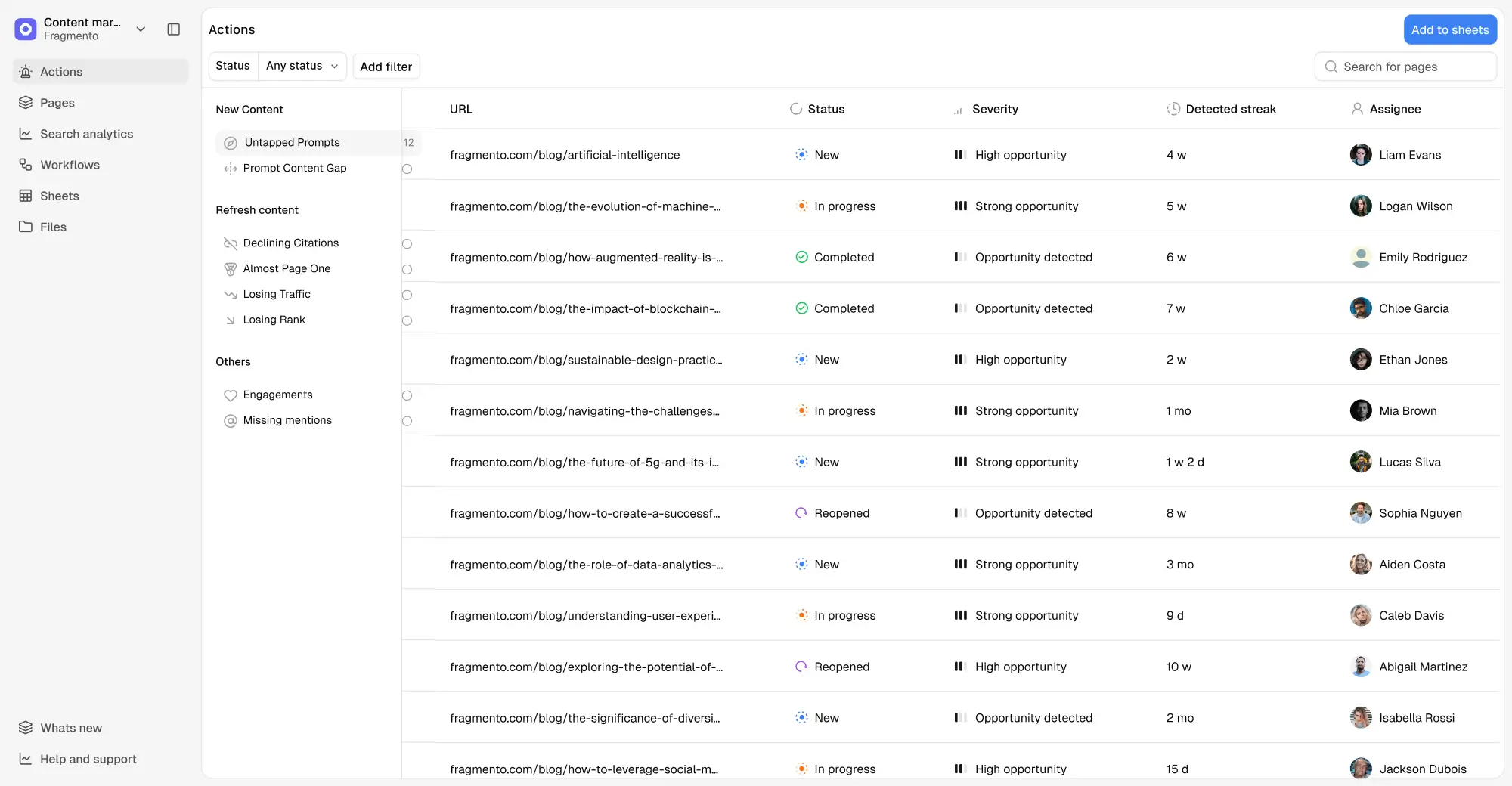
Everything you do in Slate - checking AI visibility, running workflows, managing content operations - now lives inside Claude. Your data, your workflows, and your brand context, available the moment you need them.
.webp)

39 workflow blocks. 50+ MCP tools, available from any Claude conversation.
Once connected, Claude can query your AI search analytics, build and run workflows, manage your sheets, and read or update your brand context - without leaving the conversation. You ask. Claude acts. Slate executes.
Your AI visibility data, queryable in plain English
Ask for your visibility score, share of voice, citation breakdown, sentiment by theme, or page-level performance - and get live Slate data back as a response, chart, or structured output you can act on immediately.
"Which competitors are getting cited more than us? Break it down by domain."
"What are the main sentiment themes for my brand? Show me the negative mentions under 'pricing.'"
"Which of my pages are ranking in AI answers for product comparison queries?"
Describe a workflow. Claude builds it. Slate runs it.
Slate Workflows give you building blocks across web research, SERP analysis, LLM generation, CMS publishing, conditional logic, and more. List existing workflows, create new ones, run them on demand, and check results.
"Show me my available workflows."
"Create a workflow that scrapes competitor blog posts, identifies their content structure, and generates a gap analysis."
"Run the 'SEO Blog Generator' workflow for the domain example.com."
Full content operations - from a Claude conversation
Sheets are where bulk content operations live in Slate. Tell Claude to create a grid, populate it with URLs, run a workflow across every row, and export the results. The sheet appears in Slate, the workflows run, and you never opened the UI.
"Show me the rows in my 'Content Calendar' sheet."
"Add these 50 URLs to the content refresh sheet and mark them priority high."
"Download my 'Campaign Results' grid as a CSV."
Your brand context, readable and updatable from anywhere you work
Ask Claude to check your brand positioning, update a content type, or pull your competitor list. Every Brand Kit update goes through the same versioning and approval system - and MCP users can publish changes entirely from Claude.
"List my Slate workspaces and switch to the Helpshift workspace."
"What's the current brand voice definition in our Brand Kit?"
"Update the enterprise audience description in Brand Kit."

What changes when it's all in one conversation
Each capability is useful on its own. But when your analytics, workflows, content operations, and brand context are all in the same thread, the work changes shape. Question to answer to action - without switching tools.
Slate MCP connects Claude to every part of your Slate setup
Every product in the Slate platform is accessible via MCP: your AI search analytics, your Off Page outreach data, your Workflows, your Sheets, your Context layer. The dashboard is still there if you want it.

AI Search Analytics

Action

Workflows
Pages

Off Page
Frequently Asked Questions
What is Slate MCP?
Slate MCP connects your Slate workspace to Claude using the Model Context Protocol. MCP is the secure, open standard that lets AI assistants access external tools directly - without you manually copying data between them. With Slate MCP enabled, Claude has access to 50+ Slate tools across analytics, workflows, sheets, and brand context.
What is MCP? Do I need to understand it to use this?
MCP (Model Context Protocol) is an open standard that lets AI assistants like Claude connect to external tools securely. You don't need to understand the protocol to use Slate MCP. Setup takes a few minutes, and after that the connection is invisible - you just ask Claude things and it uses your Slate data to answer.
Is the connection secure?
Yes. Slate MCP uses OAuth 2.0 for authentication - the same security standard used by Slack, Google, and enterprise software at scale. Claude accesses your Slate data through a secure, authenticated pipeline. Your credentials are never exposed to Claude directly, and you authenticate once through your normal Slate login.
Which Claude clients does Slate MCP work with?
Slate MCP works with both Claude Web (claude.ai) and Claude Desktop. The setup process is the same for both — Settings → Connectors → Add custom connector. Once connected, the Slate tools are available in every conversation regardless of which client you use.
What Slate data can Claude actually access?
Claude has access to four categories of Slate data via MCP: AI Search Analytics (visibility, citations, sentiment, page performance, competitor data), Workflows (list, create, publish, run), Sheets (read, write, execute workflows on rows, export), and Brand Kit + Workspace (brand context, dimensions, workspace management). The connection is read/write - Claude can both retrieve data and take actions in your Slate workspace on your behalf.
Can I manage multiple client workspaces from Claude?
Yes. Ask Claude to list your workspaces, then tell it which one to use. From that point, every Slate action in the conversation operates in that workspace. Switch again at any time by asking. This makes Slate MCP particularly useful for agencies or teams managing multiple brands — one Claude window, every client workspace.
Start winning the mentions that shape AI recommendations
Partner with our experts to audit your content library and deploy a system that keeps your brand visible.