

Why It Matters
Search Console holds Google’s own numbers for your site: which queries showed your pages, and which got clicks. Seeing them in Slate, next to your tracked keywords, tells you where your search traffic comes from without switching tools.Where to Find It
Open Organic Search, then select Google under Search Console. The page title reads Google Search Console.Search Console vs. Tracked Keywords
Search Console reports the queries Google showed your site for, with real clicks and impressions. Tracked keywords are the keywords you add yourself, and Slate checks where they rank in Google on the schedule you set.Before You Connect
Until Search Console is connected, the page shows sample data for a made-up site. A Sample data strip at the top says “Connect Search Console to see yours.” Click Connect Search Console to open Integrations. If the page shows Search Console isn’t connected instead, click Connect in Integrations. To connect your account and pick your site, see Google Search Console.Dates
Click the Dates pill to pick Last 7 days, Last 28 days, Last 30 days (default), Last 90 days, or Custom range…. Preset ranges end yesterday, because Google has no data for today yet. Next to the pill:- A note says dates are in Pacific Time, as Google reports them.
- Data through shows the last day Google has reported, for example “Data through Nov 14.”
- Your Search Console property, such as
example.com.
Overview
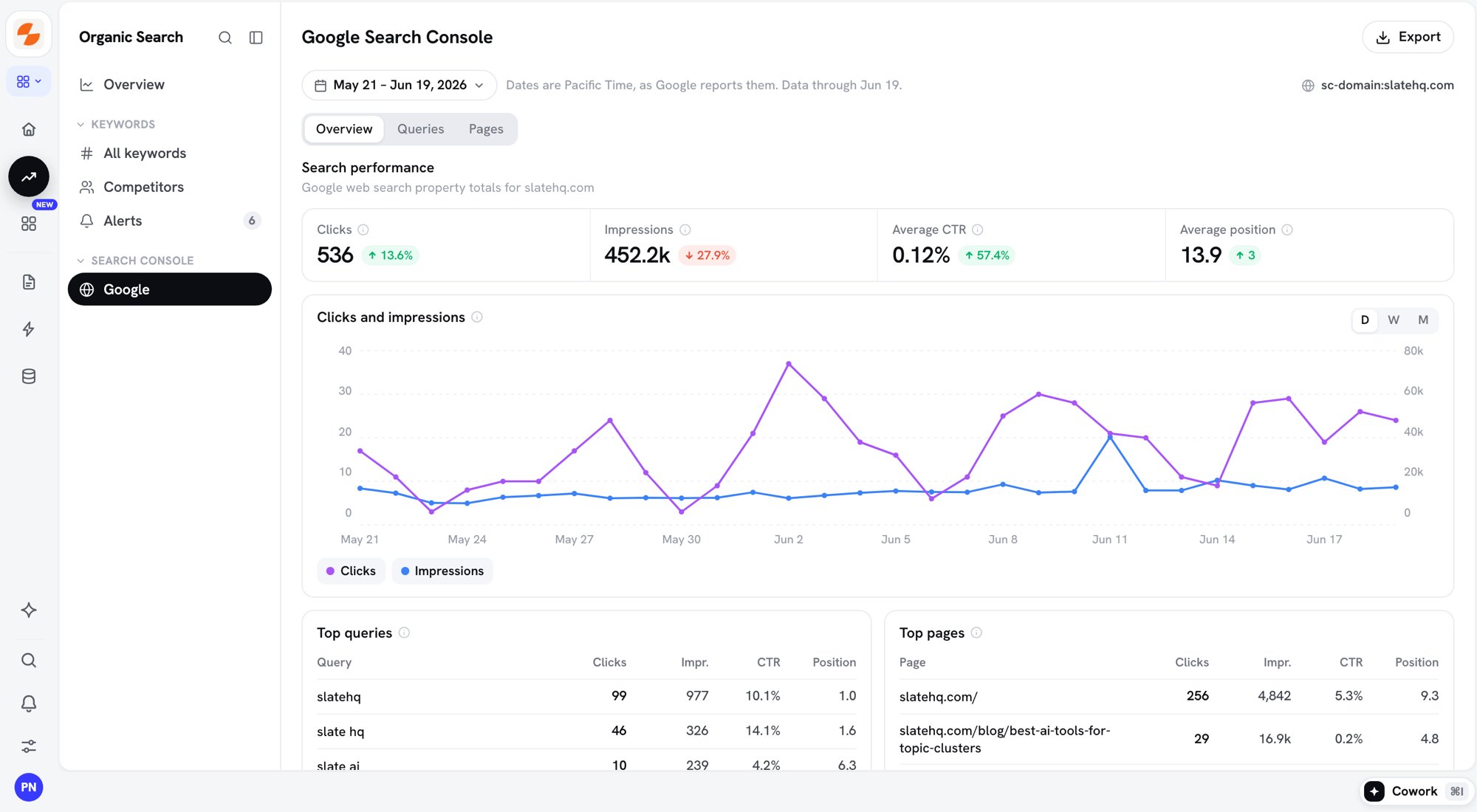
Search Console Overview tab
Each number shows its change from the previous period of the same length. The change in Average position is in positions.
Clicks and impressions charts clicks (left axis) and impressions (right axis). Click D, W, or M to group by day, week, or month. Weeks start on Monday. Google settles a day’s numbers after about two days, so the latest days are shaded until Google finalises them.
Below the chart, Top queries and Top pages list the eight with the most clicks.
Queries
The Queries tab names the query that got you the most clicks and your site’s average CTR. The Queries table lists every query with Clicks, Impr. (impressions), CTR, and Position. Google leaves out rare queries to protect privacy. Your queries add up to fewer clicks than the property total.Pages
The Pages tab names the page that got you the most clicks. The Pages table lists your pages that appeared in Google web search in the dates, with the same columns. The table uses the pages Slate syncs from Search Console for Pages. To change which pages Slate syncs, open Pages and click the gear button (Google Search Console sync settings).Sort and Search the Tables
- Click a column header to sort, highest first. Click it again for lowest first. Tables sort by Clicks by default.
- Type in Search queries or Search pages to filter the table.
- Each table page shows 15 rows. Use the page numbers or arrows at the bottom to move between them.
Export
Click Export next to the page title to download a CSV file of the tab you’re on, with its dates, search, and sort.
A file holds up to 10,000 rows. Export is off on sample data.
When the Page Is Empty
- No clicks from Google in these dates: Google reports no clicks for your site in the range. Pick a longer range.
- No Search Console data in this range. Pick other dates to see it.: Google has reported nothing for these dates.
- No queries contain ”…” in these dates. or No pages match ”…” in these dates.: clear the search box.
Tips
- Sort Queries by Impr. to find queries where your site shows up often. A low CTR on one of them can point to a title or description worth rewriting.
- Check Data through before you compare the latest days. Google’s numbers for the last two days can still change.
- Add queries that bring clicks to your tracked keywords to follow their rank over time.
What’s Next
- Organic Search overview: track keyword ranks and see Search Console totals next to them
- Competitors: how competitors rank for your tracked keywords
- Alerts: ranking changes that need attention
- Pages: how each page performs in search and AI
- Google Search Console: connect Search Console and choose which pages to sync