

What is Cowork?
Cowork is a chat workspace where you work with Slate, your AI agent. Describe what you need in plain language, and Slate plans the work, runs the right tools, and streams the results back to you. Use Cowork for open-ended, one-off work — research, audits, analysis, planning, and content. To open it, click Cowork in the sidebar.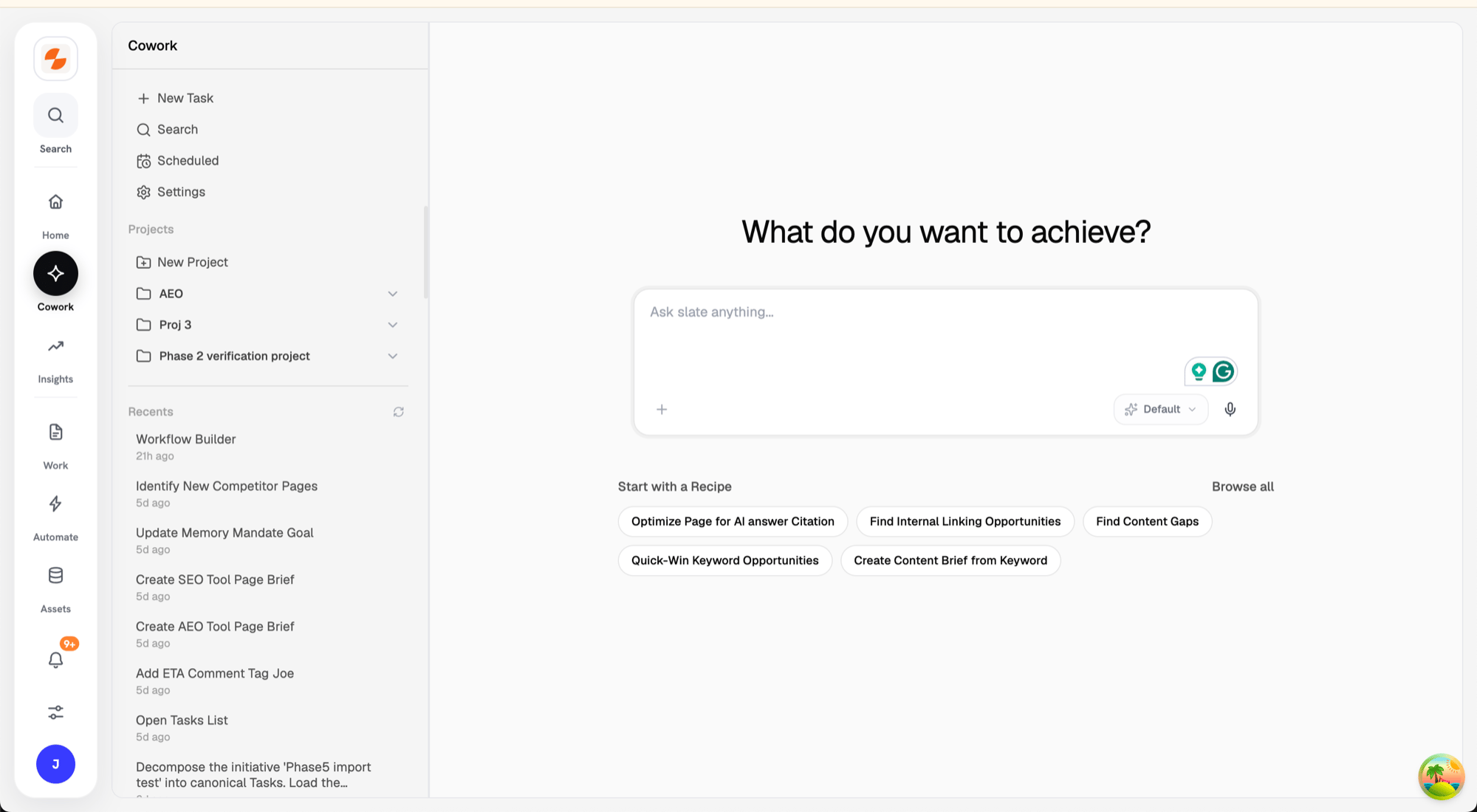
The Cowork workspace
Why use Cowork?
A Recipe runs a fixed, repeatable procedure. Cowork is the opposite end: open-ended and conversational. When a task is exploratory or you only need it once, ask Slate directly instead of building a procedure first. If you find yourself asking for the same multi-step task again and again, capture it as a Recipe.Start a conversation
A new task opens on What do you want to achieve? There are two ways to begin:- Type a request in the input box (“Ask slate anything…”) and send it.
- Pick a recipe under Start with a Recipe. Slate runs that Recipe in the conversation. Click Browse all to see every recipe.
The Cowork workspace
The screen has three areas:- Left — your work. The Cowork sidebar has New Task, Search, Scheduled, and Settings, then your Projects and Recents. Each conversation is a Task.
- Center — the conversation. Your messages and Slate’s responses, plus a live view of what Slate is doing while it works.
- Right — the preview panel. Opens to show generated documents and files.
What you can do
- Ask anything in plain language — a question, an instruction, or a multi-step task.
- Attach files for context. Click +, then Upload from computer or Attach from workspace (tabs: Knowledge base, Artifacts, Brain). You can also drag and drop or paste files. Attach up to 3 files per message; images can be up to 10 MB. Supported types: CSV, TSV, XLSX, PDF, TXT, MD, DOC, DOCX, PNG, JPG, WEBP, and GIF (not
.xls). - Use slash commands to point Slate at a specific resource or scope. Type
/in the input box to see them:
- Pick a model for a message. Auto picks a model by task complexity and is the default. If an admin pinned a fixed default model, the selector starts on that model. Some models offer thinking levels.
- Pause and resume. While Slate works, click the stop button. The run pauses at the next safe checkpoint. Send a message to resume or steer it.
How Cowork works
When you send a request, Slate:- Plans the steps it will take.
- Runs tools — research, analytics, writing, and workflows.
- Streams its activity so you can watch progress in real time.
- Pauses when needed — to ask for your approval before a sensitive action, or for input when it needs a decision.
Outputs
Slate’s results appear in the conversation in two forms:- Answers and content — text and structured content shown inline.
- Files — generated documents such as PDF, DOCX, XLSX, and CSV. Open them in the right-hand preview panel and download them from there.
Tasks, Projects, and schedules
- Each conversation is a Task you can reopen anytime from Recents in the sidebar.
- Group related tasks into a Project. Click New Project to create one.
- A task’s ⋯ menu has Move to project, Remove from project, and Delete task. Deleting happens right away, without a confirmation step.
- Click Search (“Search chats and projects”) to find a task or project by name. Selecting a project opens its files and tasks, each with a status: Running, Working, Needs Approval, Needs Input, Closed, or Idle.
Scheduled tasks
There’s no create button. To create a schedule, ask Slate in the chat to repeat a task, such as every Monday morning. Click Scheduled in the Cowork sidebar to manage schedules. Hover a schedule for Run now and Run history. Its ⋯ menu has Edit, to change the name, instructions, or timing (Daily, Weekly, or Monthly), and Delete. Use the switch to pause or resume a schedule. Schedules marked System are maintained by Slate. You can pause them or run them now, but not edit or delete them.Collaborate on a task
The task’s owner sees a Collaborate button at the top right of the conversation. Choose Private, Specific people, or Anyone in workspace. If you share the task, choose Can view or Can collaborate (message Slate in the task with you), then click Save access. Collaborators see a Collaborating badge; viewers see Shared · View only. Tool approvals and access settings stay with each request’s owner.Agent settings
Click Settings in the Cowork sidebar to open Agent Settings:- Models — how Slate picks models for new chats. Only admins can change these settings.
- Memory — opens Memory under Assets → Memory.
- History — past sessions and feedback. Admins only.
Use cases
A few common ways to put Cowork to work:- Find keyword opportunities — ask Slate to surface high-upside keywords and where you can realistically rank.
- Audit a page against competitors — point Slate at a page (like pricing) and get a prioritized list of gaps and fixes.
- Analyze your top pages — have Slate review your best-ranking pages and explain what is working.
- Draft content — turn your top keywords into a blog draft or outline, grounded in current rankings.
- Run a technical SEO audit — generate an audit checklist for a site or a section.
- Check AI visibility — use
/trackerto see how your brand shows up in AI answers and which sources get cited. - Work with a sheet or workflow — use
/sheetsor/workflowto run or analyze a specific Slate resource, then/tracker-exportto pull a report or CSV.
Troubleshooting
- “Not enough credits to start this run.” Your workspace doesn’t have enough credits for the run. Your message stays in the input bar. Click Add credits to see plans.