

What is AI Visibility
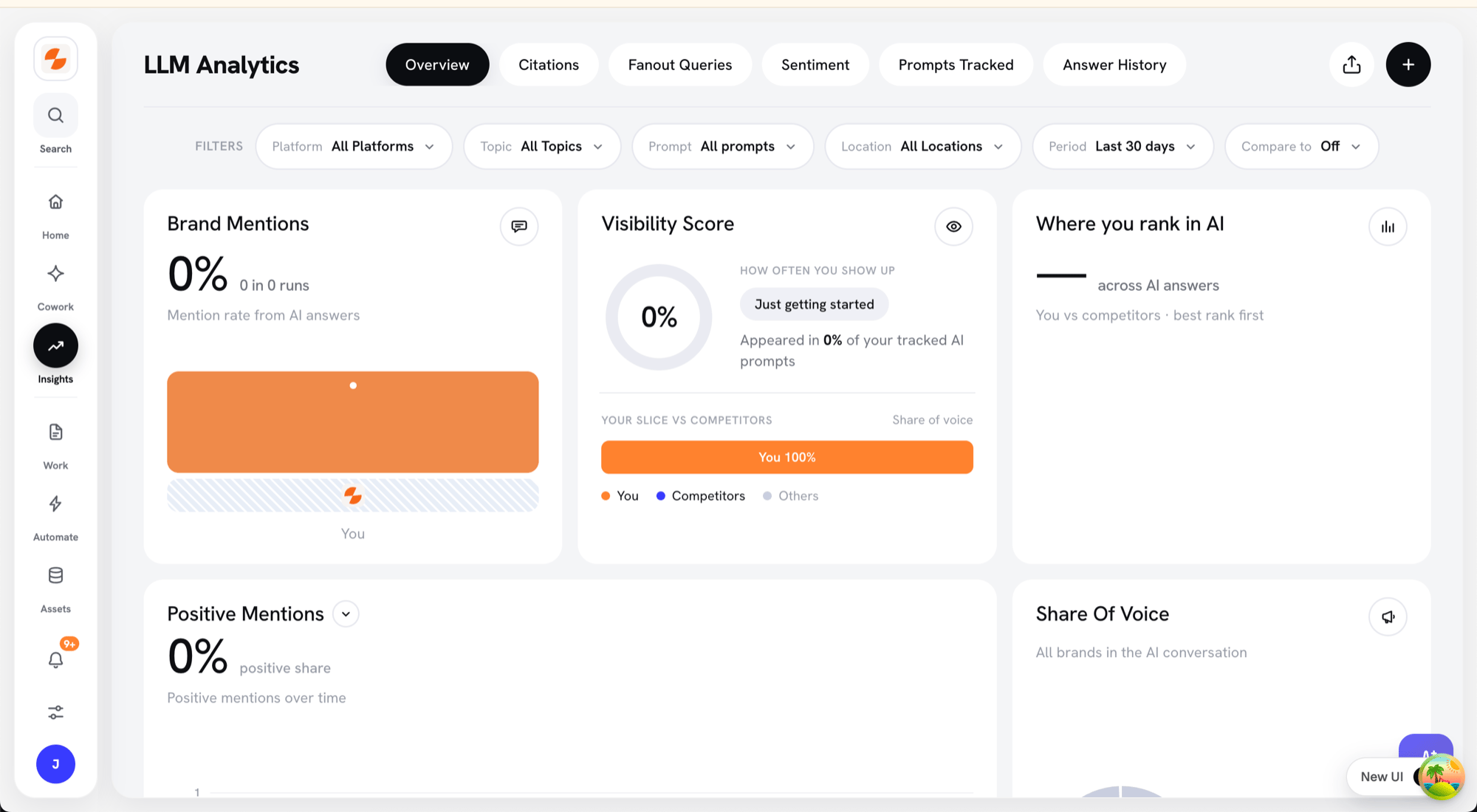
The AI Visibility Overview tab
Where to Find It
Open Insights → AI Visibility in the Slate sidebar. The module has six tabs: Overview, Citations, Fanout Queries, Sentiment, Prompts Tracked, and Answer History.Why It Matters
AI-generated search results are changing how people discover products and brands. Even if you rank well on Google, AI engines might not mention you at all — which means you’re invisible in the new discovery layer. AI Visibility helps you:- Measure brand visibility across AI search platforms
- Identify missed opportunities where competitors are being mentioned but you’re not
- Track improvements over time as you publish new content or optimize existing pages
- Defend your brand by monitoring accuracy and presence in AI-generated answers
How AI Visibility Works Inside Slate
AI Visibility in Slate continuously monitors how your brand and competitors appear across AI-powered search engines and answer engines like ChatGPT, Perplexity, and Google AI Overviews. It helps marketers measure visibility, track brand mentions, and identify missed opportunities in the emerging AI search landscape.How It Works
- Prompt Tracking
- Slate runs a set of structured prompts (queries) across AI platforms.
- Each prompt is designed to simulate real user questions in your industry or niche (for example, “Best B2B marketing agencies” or “Top SaaS SEO tools”).
- Data Collection
- Every time an AI system responds, Slate analyzes the result to identify which brands are mentioned, cited, or ranked in the output.
- It records these mentions as “runs,” forming the dataset that powers your analytics dashboard.
- Competitor Comparison
- AI Visibility doesn’t just monitor your brand — it also compares you against competitors configured in your workspace.
- This helps you understand your share of visibility within the same topics and platforms.
- Trend Analysis
- Over time, Slate aggregates data from multiple runs to show changes in visibility, position, and mentions.
- Trend charts show how these metrics change across the selected Period.
Filters
The filter bar at the top of the Overview tab has six filters. Your selections carry over to the other AI Visibility tabs until you reload the page. To reset them, click Clear in the filter bar.Platform
Select one or more AI platforms to analyze: ChatGPT, Google AI Overviews, Google AI Mode, Perplexity, Claude, and Gemini. The default is All Platforms.Topic
Select one or more topics to analyze how your brand performs for different subject areas. To create, rename, or delete topics, open the Topic filter and select Manage topics…. Deleting a topic moves its prompts to “No Topic”.Prompt
Select one or more tracked prompts to focus on specific questions. The default is All prompts.Location
Show results for a single country, or keep the default, All Locations.Period
Choose the time window: Last 7 days, Last 30 days (default), Last 3 months, Last 6 months, Last year, or Custom.Compare to
Compare the selected period with another one: Off, Previous period (default), Same period last year, or Custom. When a comparison is on, the cards show the change from that period.Key Metrics Explained
1. Brand Mentions
Shows your mention rate: the percentage of AI answers to your tracked prompts that mention your brand. The card also shows the count, such as “In 12 of 40 answers,” or the change in mentions when a comparison is on. A bar chart compares your mentions with the competitors and other brands named most often. Use it to:- Measure brand awareness inside AI systems
- Spot which topics or queries trigger the most mentions
2. Average Position
Indicates your brand’s average rank within AI-generated results. A lower number means your brand is appearing earlier or higher in responses — a sign of stronger authority or relevance. The Where you rank in AI card shows your average position as a rank, such as “3rd.” A bar chart compares you with competitors, best rank first. Use it to:- Track whether your brand is gaining or losing prominence
- Identify high-performing topics where your brand consistently ranks near the top
3. Visibility Score
A composite metric showing overall brand presence across all tracked AI platforms. The score is calculated based on your brand’s position in AI-generated responses:- Position 1: 100% visibility
- Position 2: 90% visibility
- Position 3: 80% visibility
- Position 4: 70% visibility
- Position 5: 60% visibility
- Position 6: 50% visibility
- Position 7: 40% visibility
- Position 8: 30% visibility
- Position 9: 20% visibility
- Position 10: 10% visibility
- Position 11+: 0% visibility
- See how widely your brand is recognized by AI engines
- Measure the impact of new content or campaigns on AI visibility
- Understand whether your brand appears in high-value top positions or lower-value positions
4. Share of Voice
Represents your brand’s percentage of total mentions compared to all brands named in AI answers (your brand, your competitors, and other brands). How it’s calculated: Share of Voice = (Your Brand Mentions / Total Mentions) × 100 Where Total Mentions = Your Brand Mentions + All Competitor Mentions + Other Brand Mentions Example:- Your brand appears 15 times
- Competitor A appears 20 times
- Competitor B appears 10 times
- Other brands appear 5 times
- Total mentions = 15 + 20 + 10 + 5 = 50
- Your Share of Voice = (15 / 50) × 100 = 30%
- Benchmark yourself against competitors
- Track market dominance and growth over time
- Identify gaps where competitors are mentioned more frequently
Example View (Dashboard Summary)
On the Overview tab, you’ll see these cards:- Brand Mentions, Visibility Score, and Where you rank in AI summarize your key metrics.
- A trend chart shows one metric over time. Switch metrics with the chips: Brand Mentions, Visibility, Average Position, Citations, and Positive statements. Where available, click Compare to add up to 3 competitors as extra lines.
- Share of voice shows how mentions split across brands.
- Top Fanout Queries lists the most frequent fanout queries.
- Top Domains lists the domains that appear most often in citations.
- Platform-Level Distribution compares Visibility, Share of Voice, Citations, and Rank for each platform. Platforms you don’t track yet appear in a “Not tracked yet with” row. Click Track your prompts to add prompts for them.
- Topic-Level Distribution shows which brands lead each topic. Hover a brand for its numbers.
Share or Download the Overview
Click the export icon in the top-right toolbar, then choose:- Share — creates a link to an AI Visibility report for your current filters. Slate copies the link to your clipboard and opens it in a new tab. Anyone with the link can view the report.
- Download — saves an Excel workbook (.xlsx) with Filters, KPI Summary, Entity Comparison, Platform Breakdown, Trend Data, and Raw Data sheets. The Raw Data sheet includes up to 50,000 rows.