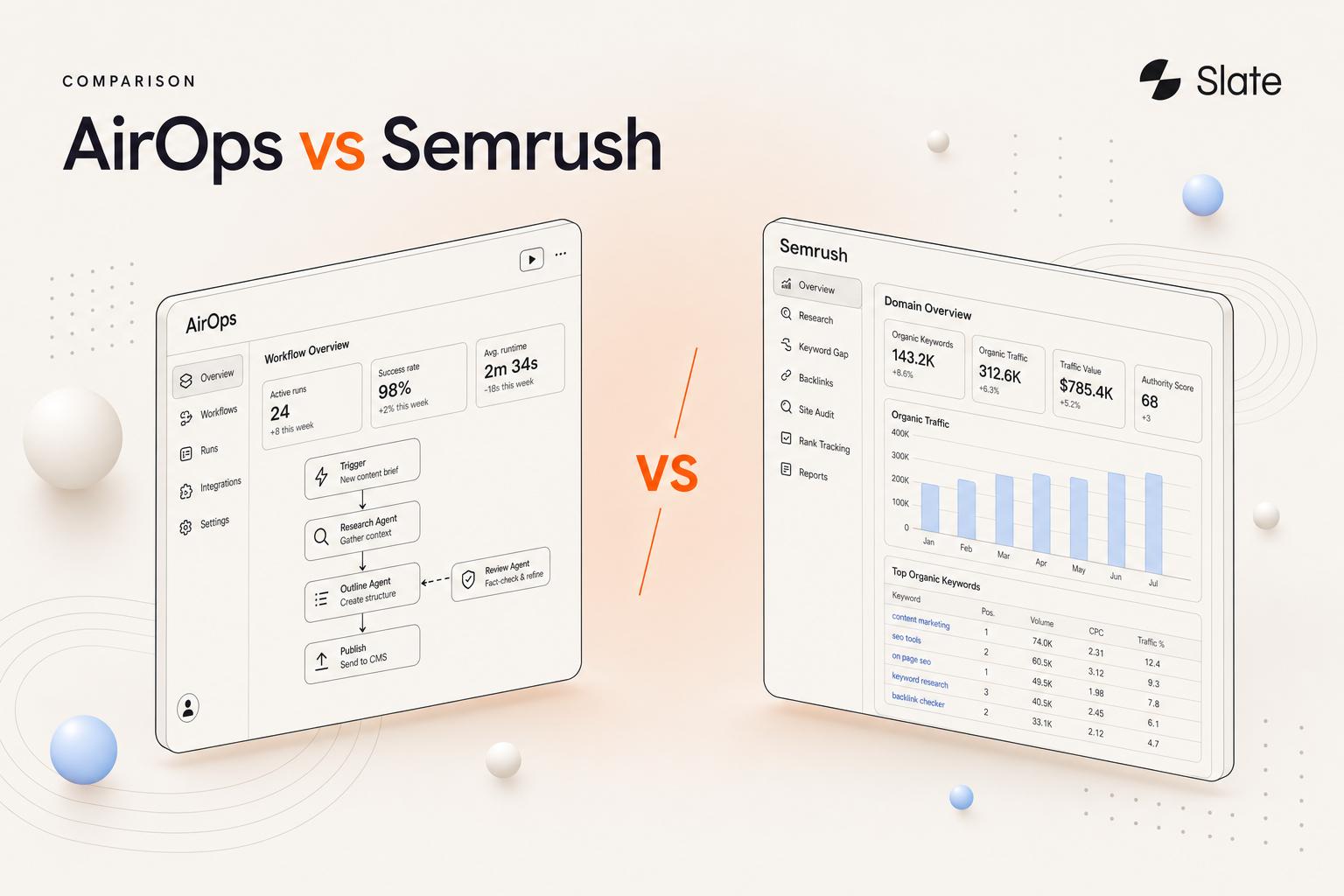
AirOps occupies an interesting position in the AI content tools market. It is not a writing assistant, it is a workflow platform that lets content and SEO teams build repeatable, multi-step AI pipelines for content production, optimisation, and publishing. That distinction has earned it a 4.6/5 rating on G2 across 111+ reviews and notable customers including Webflow, Ramp, and Carta.
But ratings and logos tell an incomplete story.
Across G2 reviews, Reddit threads, and a growing body of practitioner analyses, a more nuanced picture emerges: one where the platform's genuine strengths are offset by pricing complexity, operational demands, and feature constraints that prospective buyers should weigh carefully.
54+ reviews out of 111 on G2 references learning difficulties, 21+ cite pricing to be too steep for the ROI. These complaints do not come exclusively from negative reviews, many 4-star and even 5-star reviewers flag the same issues.
We evaluated AirOps across its pricing structure, feature set, operational demands, and real-world user sentiment independently and from third party sources. Our sources include G2 reviews (111+), Reddit discussions, Product Hunt commentary, and practitioner analyses from Marketer Milk, SyncGTM, Profound, Ahrefs, GetMint, Rankability, GrowthLane, Metaflow, ContentMonk, and Analyze.ai. This is what we found.
Who Is AirOps For (and Who Should Skip It)?
Ideal Users
AirOps delivers the most value to teams that already think in systems and workflows. If your bottleneck is execution speed, and you have the budget and process maturity to commit to a platform that requires setup investment, AirOps is worth an evaluation.
The platform fits SEO managers handling large content refresh backlogs across hundreds of URLs, content teams with established editorial workflows that need to scale output without sacrificing brand voice, agencies managing multiple client SEO campaigns where repeatable processes are essential.
Who Should Look Elsewhere
AirOps will accelerate production, but it will not improve what is being produced. If your team does not have a proven content strategy, the platform will help you produce mediocre content faster. That is not a feature.
This is a platform you configure, not a tool you install. The platform assumes foundational knowledge of content strategy, SERP analysis, and editorial operations.
It’s also not a fit for GTM or sales teams needing lead enrichment, outbound prospecting, or CRM sync. AirOps does not do any of this below the Pro tier.
AirOps Features and Capabilities: A Quick Overview
AirOps is built around a set of interconnected modules. Rather than describing each in depth, here is a summary of what the platform offers and where each feature sits in terms of maturity and practical value.
AirOps is built around a set of interconnected modules. Rather than describing each in depth, here is a summary of what the platform offers and where each feature sits in terms of maturity and practical value.
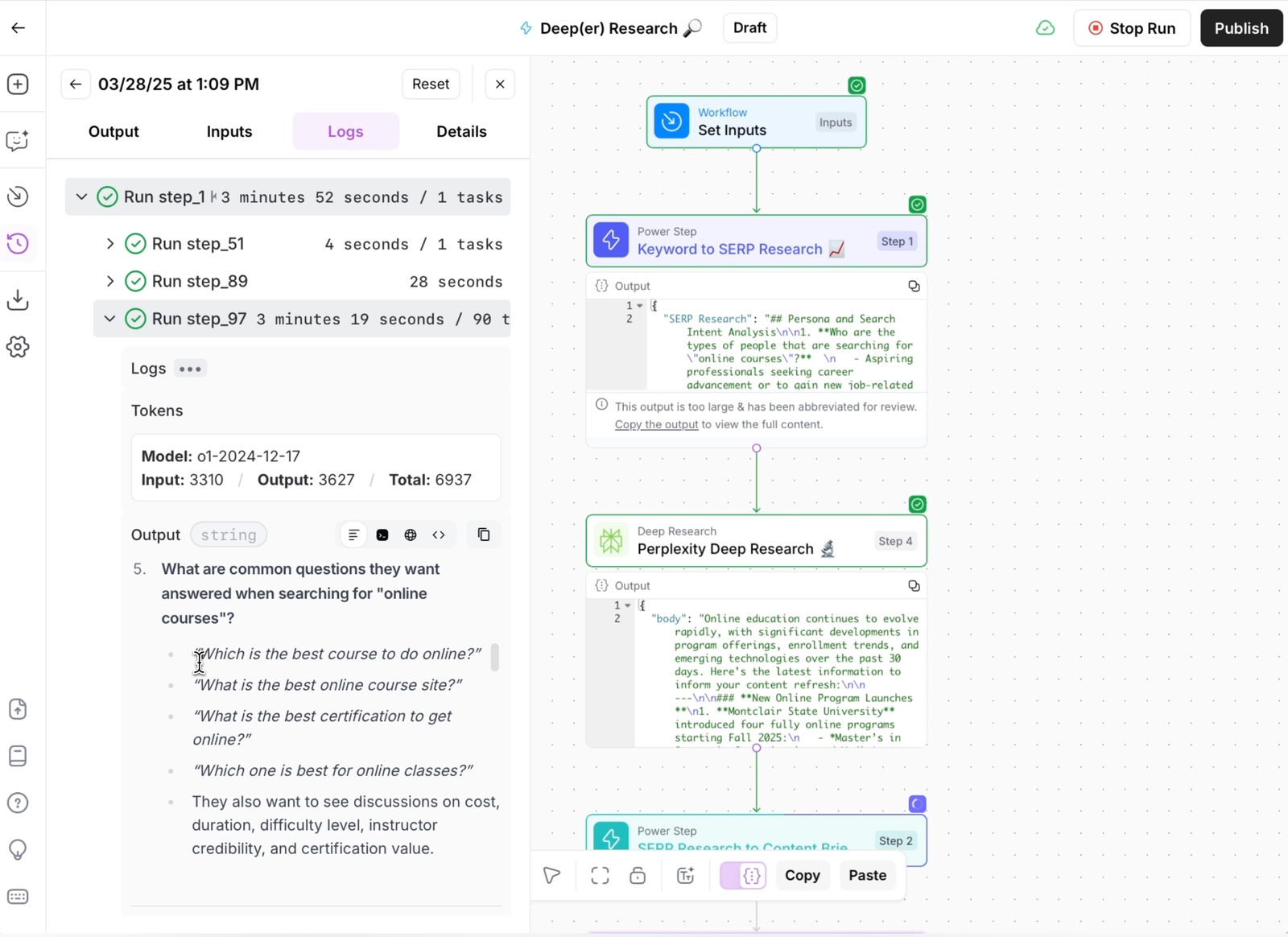
AirOps has also invested in user education through an Academy, cohort-based training with recognised SEO practitioners, and detailed documentation.
These are real strengths. But they come with conditions worth examining in detail.
AirOps Pricing: What You Need to Know
The Plans, As Published
AirOps offers three published tiers: Solo, Pro, and Enterprise, along with a free trial that provides access to limited features and credits for testing.
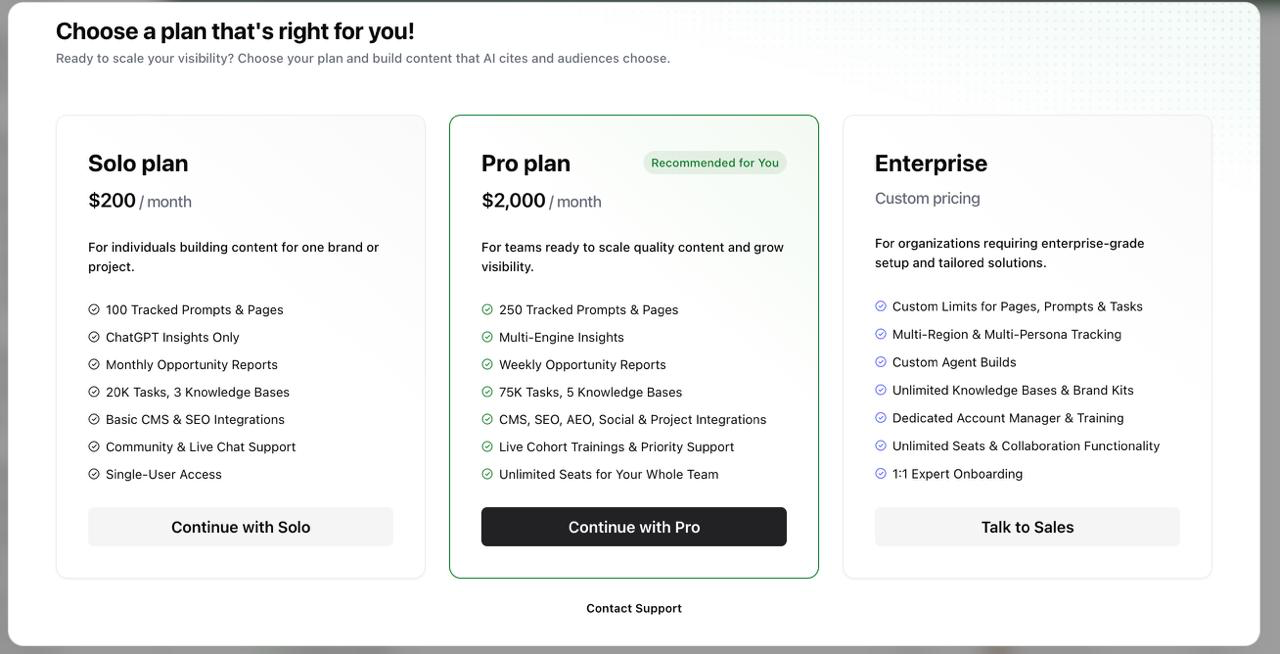
Solo: $200/month
- 20,000 tasks/month included
- 100 tracked prompts and pages
- ChatGPT visibility insights only
- Monthly opportunity reports
- 1 Brand Kit, 3 Knowledge Bases
- Basic CMS and SEO integrations
- Community and live chat support
- Single-user access
Pro: $2,000/month
- 75,000 tasks/month included
- 250 tracked prompts and pages
- Multi-engine insights (ChatGPT, Google, Perplexity, Google AI Studio)
- Weekly opportunity reports
- 1 Brand Kit, 5 Knowledge Bases
- CMS, SEO, AEO, Social, and Project integrations
- Live cohort trainings and priority support
- Unlimited team seats
Enterprise: Custom pricing (contact sales)
- Custom task limits
- Multiple regions, personas, and languages tracked
- Unlimited Knowledge Bases and Brand Kits
- Dedicated account manager and training
- 1:1 expert onboarding
- Unlimited seats and collaboration functionality
AirOps also offers a 14-day free trial with limited free testing credits to explore features before committing.
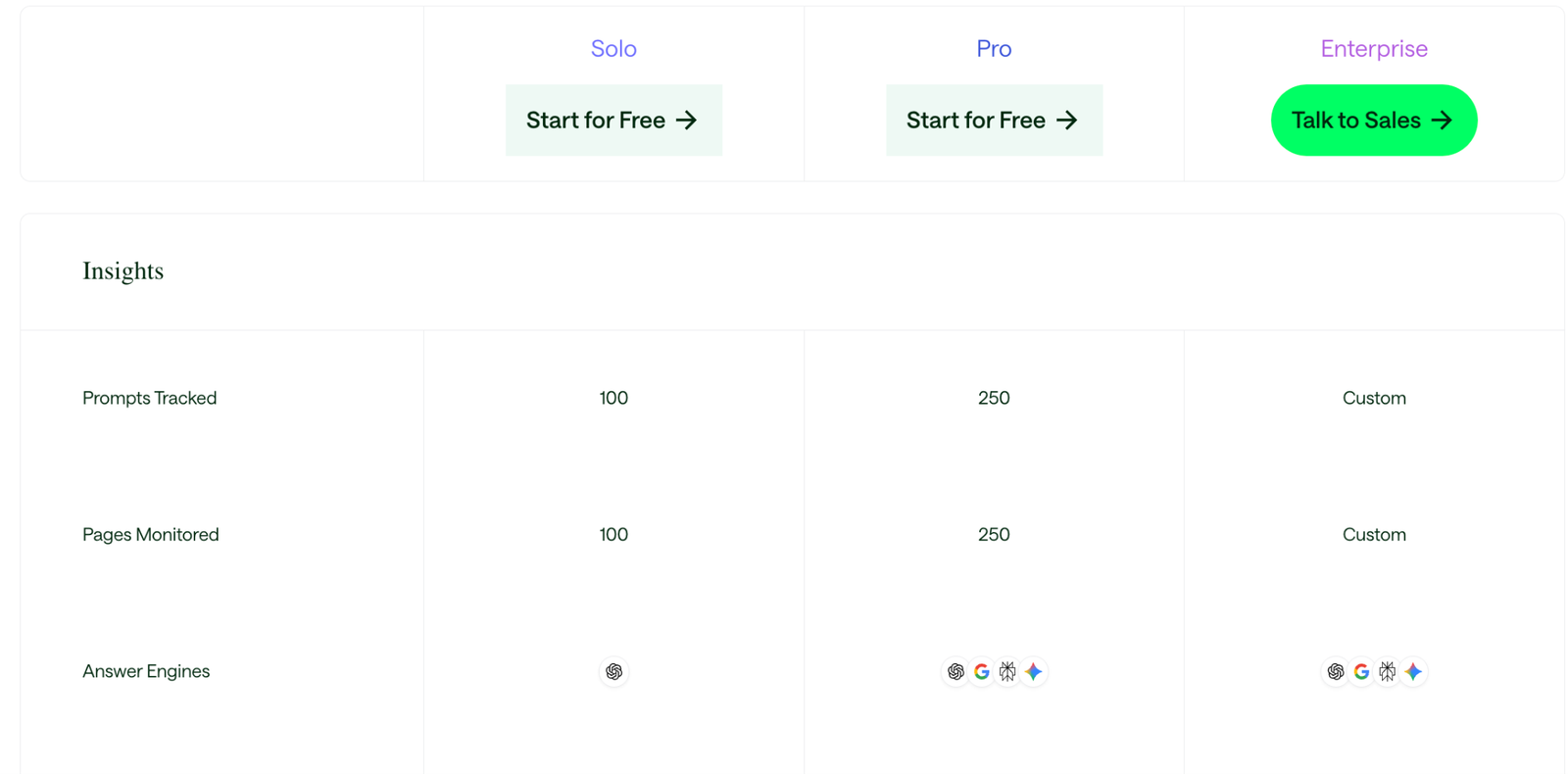
Note: AirOps' pricing page uses "Start for Free" language for Solo and Pro, indicating a free trial period, not permanently free tiers. Enterprise requires a sales conversation.
Hidden Costs to Watch
Beyond the base subscription, there are cost layers that are easy to miss during evaluation:
- Overage billing at $0.025 per task beyond your plan limit: a team overshooting by 40,000 tasks adds $1,000 to their monthly bill.
- Testing credits consume tasks from your monthly allotment: no sandbox, no separate testing budget, so the onboarding period is actively expensive.
- Bring-your-own API keys are a paid add-on for Solo: included only on higher tiers.
- No annual discount transparency: the pricing page does not show annual vs. monthly billing differences, requiring a sales conversation to resolve.
The number on the pricing page is the starting point of your cost, not the ceiling.
What Does AirOps Actually Cost Per Article?
This is the question that pricing pages do not answer, but it is the one that matters most.
Task consumption per article varies significantly depending on workflow complexity. Here is what independent testing and practitioner reports indicate:
- A basic workflow (keyword research → brief → draft): approximately 500–800 tasks per article (per SyncGTM's testing)
- A full-featured workflow (research, SERP analysis, draft, optimisation, human review, publishing): approximately 2,500–3,500 tasks per article (as per independent testing)
- Complex or experimental workflows with multiple AI model calls and iterations: 4,000+ tasks per article
Estimated Cost Per Article by Plan
Key insight: Teams running standard or complex workflows on the Solo plan may find themselves producing fewer than 10 articles per month before hitting their task limit. At that volume, the effective cost per article ranges from $20 to $40+, before accounting for any human editing time, which practitioner reviews estimate at 2–3 hours per 2,000-word article.
These figures vary depending on workflow configuration, AI model selection, and how many revision cycles are run. Teams should expect their first month's consumption to be higher than steady-state due to testing and calibration.
The $200-to-$2,000 Cliff
This is arguably the most consequential structural issue in AirOps' pricing. Solo costs $200/month. Pro costs $2,000/month. There is nothing in between.
A growing team that needs Multi-Engine Insights, Semrush/Ahrefs integrations, weekly opportunity reports, or more than 20,000 tasks per month faces a binary choice: stay constrained on Solo or commit to a 10x price increase.
For startups, mid-market companies, and agencies evaluating the platform for the first time, this jump is difficult to justify — particularly during a period when they are still proving ROI.
Consider what the Pro plan unlocks over Solo:
- Multi-Engine Insights (vs. ChatGPT only)
- Weekly Opportunity Reports (vs. monthly)
- 75K tasks (vs. 20K)
- CMS, SEO, AEO, Social, and Project integrations (vs. basic CMS and SEO only)
- Unlimited team seats (vs. single-user)
- Live Cohort Trainings and Priority Support (vs. community and live chat)
These are meaningful feature upgrades. But bundling all of them behind a single $2,000/month gate, with no option to pick up multi-engine tracking at $500 or team seats at $800, means teams pay for everything or settle with significant limitations.
AirOps vs Slate: Pricing and Feature Comparison
For teams evaluating both platforms, Airops starting price is $200/mo and Slate starting price is $499/mo. Here is how AirOps and Slate compare across the dimensions that matter most for pricing decisions.
Feature Gaps That Shape the Buying Decision
1. AI Visibility Is Shallow Unless You Pay $2,000/Month
The Solo plan only provides ChatGPT Insights. It does not track visibility across Google AI Overviews, Perplexity, or Gemini. Teams that are actually taking AI visibility seriously would need to invest in the Pro plan at $2,000/month to access Multi-Engine Insights.
This means a team focused on AEO faces an uncomfortable trade-off: commit to the Pro plan primarily to unlock multi-engine tracking, or layer on a separate dedicated AEO tool and manage two platforms. Either way, the Solo plan leaves a gap that matters for modern SEO strategies.
Slate tracks visibility across ChatGPT, Google AI Overviews, Google AI Mode, Perplexity, Claude and Gemini, with Claude and Gemini as an add-on, and includes 24+ AI models in its core offering instead of gating them behind a premium tier.
2. Content Quality Requires Ongoing Calibration
AirOps' Brand Kit system is well-designed in concept, but user reviews reveal it requires significant iteration. One reviewer from Profound documented that specifying an "empathetic" tone caused the platform to remove all negative framing, even when contextually appropriate.
These are not deal-breaking bugs, but they add hours of manual review to workflows that are supposed to save time. Teams should expect a calibration period where output quality is inconsistent.
3. Gaps in the Content Lifecycle
AirOps focuses on production. It does not provide meaningful post-publish analytics, so teams need separate tools to measure content performance.
The platform also relies heavily on users knowing how to build workflows and how to best utilise the different features. It handles one stage of the content lifecycle while leaving teams to assemble the rest.
The Operational Reality: What Users Experience Day-to-Day
1. A Learning Curve With Financial Consequences
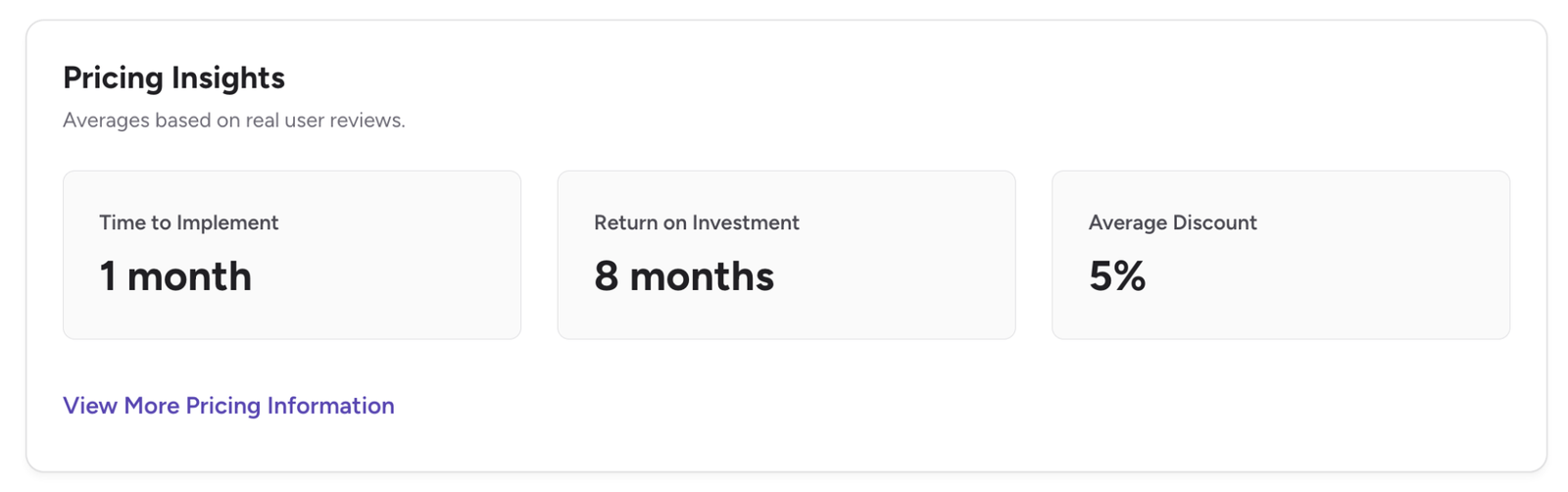
The learning curve is acknowledged in virtually every review, positive and negative. G2's aggregated data quantifies it: average implementation time of roughly one month, average time-to-ROI of approximately eight months. Multiple reviewers report 2–3 weeks before their teams felt productive.
What makes AirOps' learning curve different from typical SaaS onboarding is that the learning period is not free. AirOps provides free testing credits for workflow testing. Once those are exhausted, testing consumes tasks from your monthly allocation or triggers overage billing. Teams are spending credits while they are still learning how the platform works.
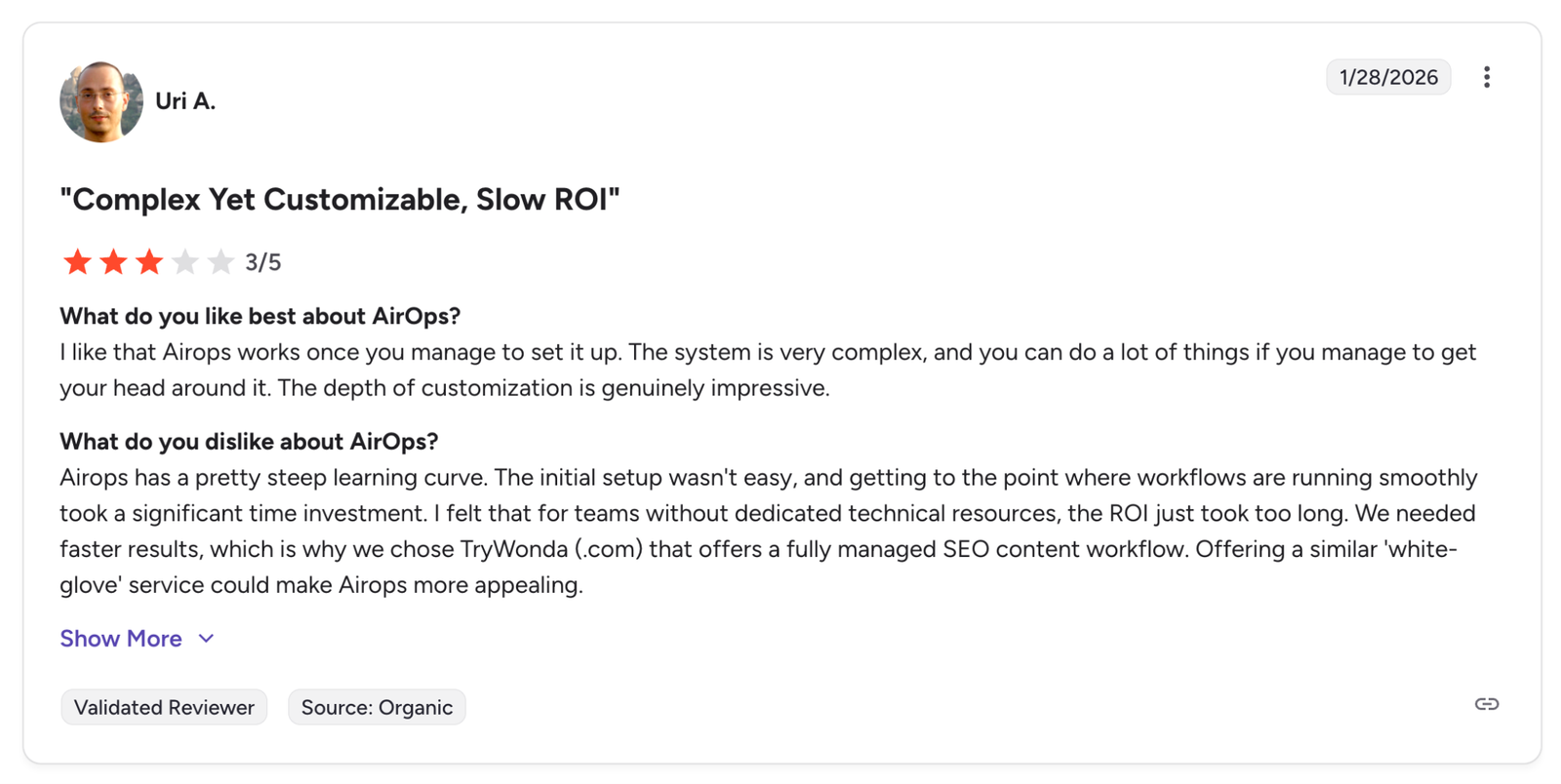
Several reviewers described needing to invest significant time upfront in experimenting with workflows before seeing value.
For a Solo plan user with 20,000 monthly tasks, a few weeks of experimentation and failed workflow runs, after the free testing credits are used, can eat a meaningful portion of the allocation before any production content is generated. The learning curve is not just a time cost. It is a line item.
2. Performance Degrades Under Load
Grids are powerful at moderate scale, but multiple reviewers report noticeable performance issues when handling 200+ rows with AI-powered columns. Clicks lag, scrolls stutter, and actions freeze until the system catches up. Teams have adapted by splitting large projects into smaller grids and scheduling heavy runs during off-peak hours.
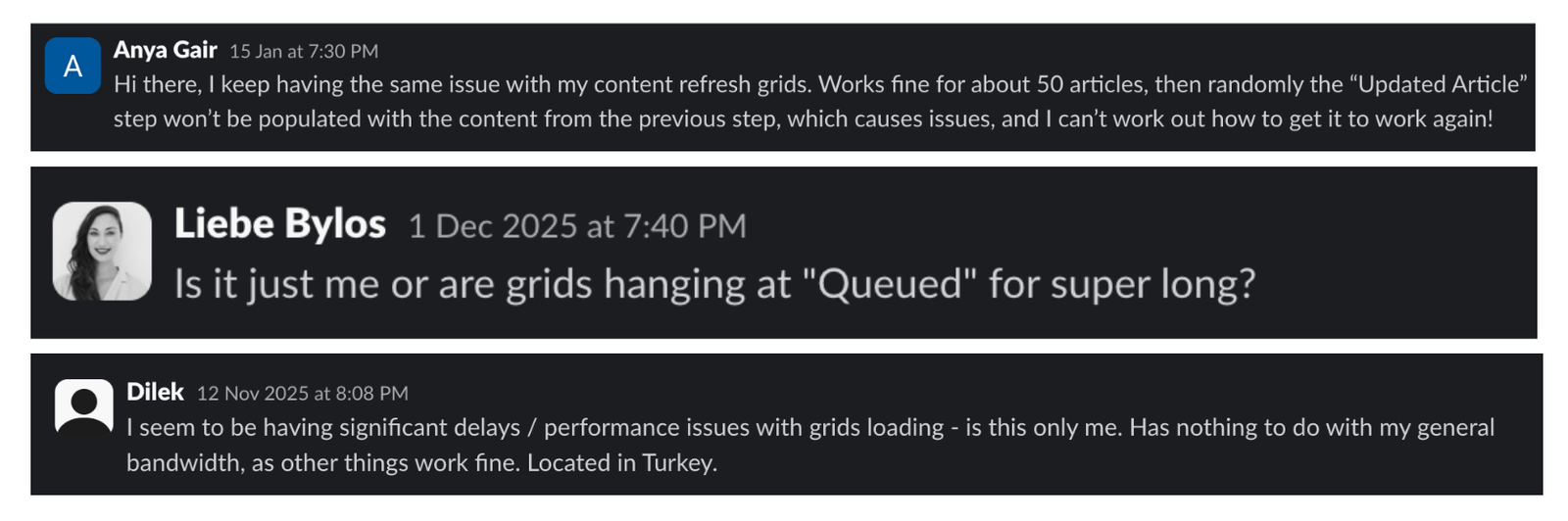
One reviewer on G2 noted that unresponsive grids and difficult navigation were recurring frustrations. Another described saving work obsessively, not because the platform was unstable, but because they did not want to lose progress when the interface slowed down.
These workarounds are manageable, but they add exactly the kind of operational overhead that the platform is supposed to eliminate.
3. Support Depends on How Much You Pay
The Pro plan includes Live Cohort Training and Priority Support. Enterprise customers receive a Dedicated Account Manager and 1:1 Expert Onboarding. At these tiers, support is consistently praised.
The Solo plan offers Community and Live Chat Support only. One G2 reviewer reported that after signing the contract, there was zero onboarding or welcome communication — no guidance on support, no account overview, nothing. The same reviewer described a billing issue where prompt tracking limits did not match the contract, with support acknowledging the problem but failing to follow up for over two weeks.
Another G2 reviewer described inadvertently clicking an upgrade button and being billed immediately, then struggling to get a response about the charge. They described the experience as reflective of a growth-at-all-costs culture with limited empathy for smaller customers.
These are individual accounts, not universal patterns. But they surface frequently enough to suggest that support quality has meaningful variance by tier.
AirOps Pros and Cons
Pros
Based on G2 reviews, practitioner analyses, and community discussions:
Saves time for content-heavy teams. Teams that previously stitched together Google Docs, Sheets, and manual CMS copy-paste report genuine productivity gains once workflows are configured.
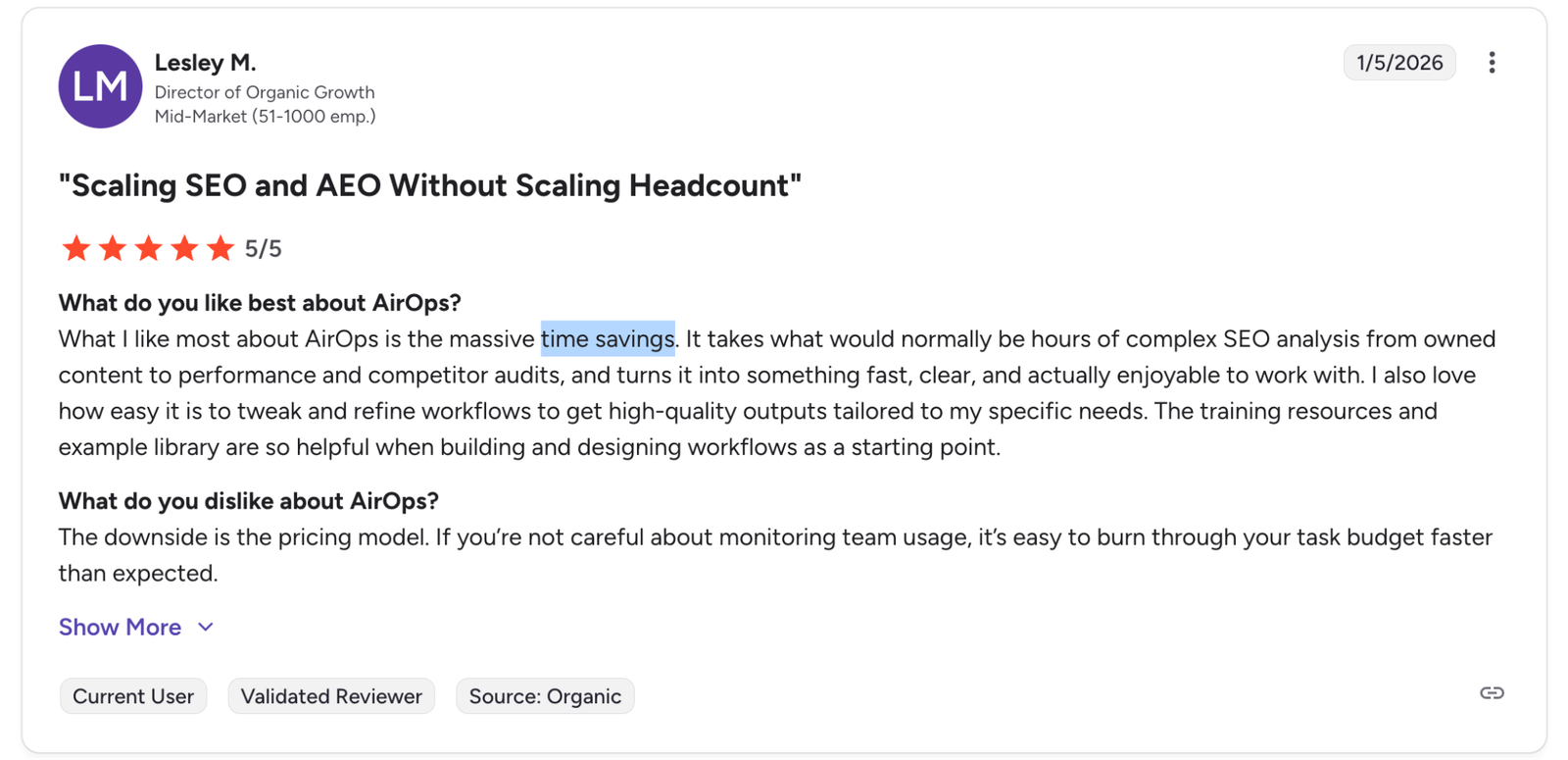
Built-in quality controls. Brand Kits and human-in-the-loop review checkpoints give teams more control over AI output.
Direct-to-CMS publishing. The integrations with WordPress, Webflow, and Shopify eliminate the draft-to-publish bottleneck..
Flexible no-code workflow creation. The Workflow Builder supports chaining multiple AI models, data inputs, and review steps.
AI search visibility is forward-looking. The Answer Engine Visibility tool positions AirOps for the AEO era, although the implementation is currently shallow on the Solo tier.
Grid view enables true content operations at scale. Processing, reviewing, and publishing hundreds of content pieces from a single spreadsheet-style interface is the feature users praise most consistently.
Cons
Based on the same sources:
Steep learning curve is universally noted. G2's complaint clustering shows 25+ reviews mentioning learning difficulty, with 17+ describing it as "significant." One reviewer called the workflow builder "so unusable" and described the platform as "selling a dream."
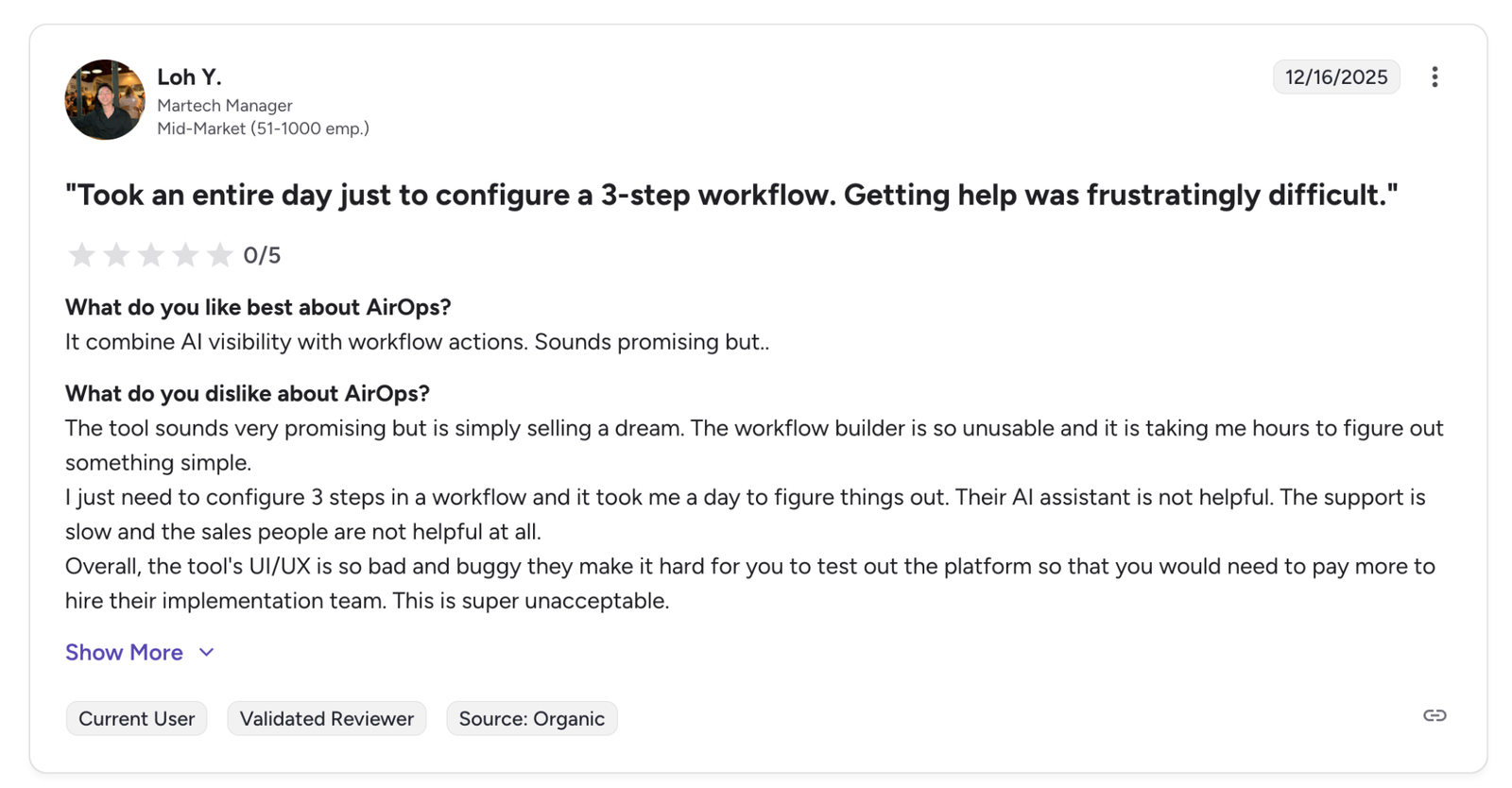
Pricing opacity and unpredictability. Task-based billing makes monthly forecasting difficult without months of historical usage data. The price is high relative to how quickly usage can scale.
The $200-to-$2,000 cliff. There is no mid-tier option. Growing teams face a binary choice between staying constrained on Solo or committing to a 10x price increase.
AI-generated content requires significant human editing. Multiple reviewers describe output as "decent but not publish-ready." Plan for 2–3 hours of editor time per 2,000-word article on top of the platform cost.
Performance slows with large datasets. Grid operations with 200+ rows and AI-powered columns experience lag, stutter, and freezing. Users have adapted with workarounds that add operational overhead.
Market Sentiment: What User Are Saying
G2 (4.6/5, 111+ reviews)
Strong overall rating, but G2's own summary clusters negatives around learning difficulty, setup challenges, and high cost perception. Specific user complaints include: the credit system being unclear, confusing testing credits, unresponsive grids, difficult navigation, and at least one account of being billed without a confirmation step.
G2 reports average time-to-implement of one month and time-to-ROI of eight months, indicators that AirOps is experienced as an operational commitment and not a lightweight tool.
Discussions carry a recurring caveat: the tool amplifies strategy but does not replace it, and Google's evolving stance on AI content means workflow velocity alone is not a strategy.
Practitioner Reviews (10+ sources)
Across analyses from Marketer Milk, SyncGTM, Profound, GetAirefs, GetMint, Rankability, GrowthLane, Metaflow, ContentMonk, and Analyze.ai, the same themes repeat: the $200-to-$2,000 price cliff, task credit unpredictability, the learning curve, and performance under load appear in nearly every independent analysis.
How AirOps Compares to Alternatives
AirOps occupies a specific niche: content operations workflow automation. It is not competing with single-task AI writing tools, nor with general-purpose marketing automation platforms. The comparison that matters is against platforms solving similar problems at similar scale.
Is AirOps Worth It? Our Verdict
AirOps has built a genuinely capable workflow platform for content operations. The Workflow Builder, Grids, Brand Kits, and CMS integrations address real problems that content teams face at scale. The platform earns its reputation among its best-fit customers.
But capability and fit are different conversations. The $200-to-$2,000 pricing cliff excludes a large and growing segment of the market. Task-based billing creates month-to-month unpredictability that complicates budgeting. The learning curve has both time and financial costs. And the feature restrictions on the Solo tier mean that teams outgrow the entry plan quickly but face a steep jump to get what they need.
These are not reasons to dismiss AirOps. They are reasons to evaluate it with clear eyes and honest numbers.
The market for AI content operations is maturing rapidly, and teams have more options than they did even six months ago, including platforms that offer transparent pricing, faster onboarding, and broader coverage across the content lifecycle without requiring a $2,000/month commitment to access core features.
Whether AirOps is the right choice also depends on whether your team's budget, process maturity, and operational tolerance align with what the platform demands.
That is a question worth answering honestly before signing the contract.
What Teams Are Evaluating Instead
For teams that find themselves in the gap between what AirOps Solo offers and what AirOps Pro costs, the natural question is: what else is out there?
Slate has built around the visibility-plus-production gap. AI visibility monitoring across ChatGPT, Perplexity, Google AI Overviews, Google AI Mode, Claude, and Gemini is part of the core platform, with Claude and Gemini as an add-on instead of a $2,000/month upgrade.
The platform includes access to 24+ AI models, integrates with Semrush, Ahrefs, GSC, and GA4 for live performance data, and publishes directly to Webflow and WordPress. Agentic workflows run on schedules without requiring a prompt each time. Sheets (Slate's equivalent to AirOps Grids) handle bulk operations across hundreds of URLs in a familiar spreadsheet interface.
Frequently Asked Questions About AirOps
What is AirOps and what is it used for?
AirOps is a no-code AI workflow platform built for content operations. It lets SEO managers, content teams, and agencies build repeatable, multi-step pipelines that chain AI model calls, data inputs, human review steps, and CMS publishing into automated workflows. The platform is used for large-scale content production, content refreshes, AEO strategy, and programmatic SEO — not for general marketing automation or sales workflows.
How much does AirOps cost?
AirOps' Solo plan costs $200/month with 20,000 tasks included. The Pro plan costs $2,000/month with 75,000 tasks and unlimited team seats. Enterprise pricing is custom and requires a sales conversation. Overage fees apply at approximately $9 per 1,000 additional tasks on Solo and $6 per 1,000 on Pro. A free trial with limited testing credits is available.
Is AirOps worth it for small teams?
It depends on what "small" means. A team of 2–3 with an established content workflow, a production volume of 30+ articles per month, and the budget for the Pro plan can extract significant value from AirOps. A solo practitioner on the $200/month Solo plan will hit feature limitations quickly — single-user access, ChatGPT-only visibility tracking, and limited integrations. G2 reports an average time-to-ROI of approximately eight months, so teams need patience and budget runway.
What are AirOps' main features and capabilities?
The core feature set includes the Workflow Builder (visual, no-code pipeline creation with 30+ AI models), Grids (spreadsheet-style bulk content operations), Brand Kits (brand voice enforcement), Knowledge Bases (proprietary data grounding), CMS integrations (WordPress, Webflow, Shopify), Answer Engine Visibility tracking, and Power Steps/Power Agents (pre-built automation templates). The platform is built specifically for content operations — it is not a general-purpose automation tool.
Does AirOps integrate with WordPress and Webflow?
Yes. AirOps offers direct integrations with WordPress, Webflow, Shopify, Contentful, and Strapi. You can draft, review, and publish content directly from the platform without switching tools. The CMS integrations are available on all plan tiers. SEO tool integrations (Semrush, Ahrefs) are gated behind Pro and Enterprise tiers.
Does AirOps have a steep learning curve?
Yes. This is the single most frequently cited concern across all sources. G2's complaint clustering shows 25+ reviews mentioning learning difficulty, with multiple reviewers describing a 2–3 week period before their teams felt comfortable building and running workflows. AirOps has invested in an Academy, cohort-based training, and documentation to mitigate this, but the platform is not plug-and-play.
How does AirOps compare to other AI content tools?
AirOps is a workflow platform, not a writing assistant. It competes with content operations platforms like Slate rather than single-task tools like Jasper or Surfer SEO. The key differentiators are its visual Workflow Builder, Grid-based bulk operations, and Brand Kit system. The key limitations are its pricing cliff ($200 to $2,000 with no mid-tier), task-based billing unpredictability, and the learning curve. For teams that need AI visibility monitoring alongside content production, Slate provides multi-engine tracking across all plans without gating it behind a $2,000/month upgrade.
Can AirOps maintain brand voice at scale?
Yes, through its Brand Kit system. You upload tone guidelines, writing samples, and formatting rules, and the AI references these when generating content. This keeps output on-brand across bulk operations. However, practitioner reviews note that calibration takes time — one reviewer documented that specifying an "empathetic" tone caused the platform to remove all negative framing. Human review remains essential for quality control.
What is AirOps' Answer Engine Visibility tool?
It is a diagnostic that evaluates how your content performs in AI-driven search results. It assesses freshness, authority signals, schema markup, and snippet extractability across AI platforms. AirOps offers a free version of this tool, but the full multi-engine visibility tracking (ChatGPT, Google AI Overviews, Perplexity, Google AI Studio) is only available on the Pro plan at $2,000/month. Solo users are limited to ChatGPT-only insights.
What are the biggest drawbacks of AirOps?
The three most cited drawbacks across all sources are: the pricing cliff between Solo ($200/month) and Pro ($2,000/month) with no mid-tier option, the steep learning curve with an average 8-month time-to-ROI reported on G2, and the task-based billing unpredictability that makes monthly forecasting difficult. Additional concerns include performance degradation with large Grid operations, the lack of post-publish analytics, and support quality variance between tiers.
How does Slate bridge the gaps that AirOps leaves?
Where AirOps separates visibility tracking from content production across tiers, Slate unifies them. AI visibility monitoring across ChatGPT, Google AI Overviews, Google AI Mode, Perplexity, Claude, and Gemini is part of the core platform, with Claude and Gemini as an add-on instead of a $2,000/month upgrade. Slate's agentic workflows run on schedules without requiring a manual prompt, users can build custom agents, and the platform integrates with Claude via MCP so teams can interact with their marketing data conversationally through Cowork. The built-in outreach engine, sentiment analysis, and prescriptive AI copilot address the lifecycle stages that AirOps does not cover — making Slate a strong fit for teams that need visibility monitoring, content operations, and performance analytics in one platform.