You’ve got 4,000 URLs, three exports that don’t agree, and a content backlog that looks like a junk drawer.
A one-time spreadsheet audit can tell you what to repair this month. It can’t keep pace with content decay or a publishing calendar that keeps feeding the machine. And now AI answers sit next to rankings as another discovery channel you have to track.
An AI content audit workflow gives you a repeatable way to collect URLs, join crawl and performance data, score pages, and assign actions like update, consolidate, or delete.
AI handles pattern spotting and first-pass recommendations. Humans check strategy, accuracy, and brand fit.
Key Takeaways
- An AI content audit workflow turns a messy URL list into scored pages with clear actions.
- The core sequence is inventory, data collection, scoring, AI review, AI visibility checks, classification, and reruns.
- AI can draft gap notes and recommendations, but humans still own accuracy and final approval.
- Every page should end with one action: keep, update, consolidate, or delete.
- A 2026 audit needs SEO visibility and AI answer visibility in the same scorecard.
- Bulk sheets and automation let the same process work for 10 URLs or 10,000.
What Is an AI Content Audit Workflow?
An AI content audit workflow is a repeatable process. The useful word is workflow.
A traditional content audit is usually a sprint: export a spreadsheet, grade pages by hand, send recommendations, and hope someone publishes the changes before the data goes stale.
An AI-assisted content audit workflow runs as an operating loop. It standardizes the inventory, applies the same scoring rules, and reruns on a schedule. A set of content workflow tools can absorb that repeat work.
That consistency gets valuable fast when you’re judging thousands of pages.
AI Content Audit vs. Traditional Content Audit
Both approaches inventory and grade content. The difference is speed, consistency, and AI answer coverage.
A manual audit can still produce a useful action list. It just won’t tell you whether ChatGPT, Google AI Overviews, Perplexity, Claude, or Gemini cite your pages. For a deeper look at how these systems select sources, our guide on how to get cited by ChatGPT, Perplexity, Claude, and Gemini breaks down the mechanics.
And in 2026, that gap costs traffic you may never see in Search Console.
Why Content Audits Need A New Workflow In 2026
Search has split into two measurement layers: rankings and AI answers.
Organic positions still count. But AI citations, brand mentions, and sentiment now influence discovery too, and those signals don’t always move with rankings.
Semrush analyzed roughly 200,000 AI Overviews and found overlap between AIO links and the organic top 10 near 20% to 26%. Ahrefs studied 863,000 keywords and found that about 38% of pages cited in AI Overviews also ranked in Google’s top 10 for the same query.
So ranking helps, but it doesn’t guarantee a citation.
Your audit needs fields for:
- SEO performance: clicks, CTR, impressions, rankings, and conversions
- AI visibility: citations, prompt coverage, brand mentions, and sentiment
- Content decay: pages older than 12 to 18 months, declining clicks, stale claims, and weaker engagement
- Production status: owner, due date, CMS status, and post-update results
The bottleneck usually lives in the handoffs: crawl data to analytics, analytics to editorial, editorial to CMS, CMS to reporting.
A modern AI SEO workflow bolts those handoffs into one loop.
Did You Know? Pages that rank and pages cited in AI answers overlap, but the overlap is thin. Recent AI Overview studies put citation-ranking overlap in the 17% to 38% range, with many data sets below 20%.
What Data Do You Need Before You Start
A content audit breaks fast when the inputs are messy. Before scoring a page, build a clean URL base.
Gather these sources:
- Sitemap export or CMS export
- Screaming Frog crawl
- Google Search Console
- GA4
- AI visibility data
Here’s what each source contributes.
Sitemap or CMS export: Your URL universe, plus page type tags like blog, product, docs, landing, or comparison.
Screaming Frog crawl: Status codes, redirects, canonicals, hreflang, thin pages, and near-duplicates.
Google Search Console: Clicks, CTR, impressions, and the queries each page earns.
GA4: Sessions, engagement, conversions, and assisted conversions.
AI visibility data: Citations, brand mentions, prompt-level answers, and sentiment across major AI platforms. If you're comparing platforms to track this, our roundup of AI visibility tools for SEO teams is a good place to start.
Normalize canonical URLs before joining anything. If your crawl, GSC, and GA4 exports use different URL keys, the scores inherit that mess.
Then tag each page by type. A docs page and a comparison page shouldn’t be judged by the same benchmark.
That tagged inventory is the base for a reliable content inventory audit.
The Seven-Step AI Content Audit Workflow
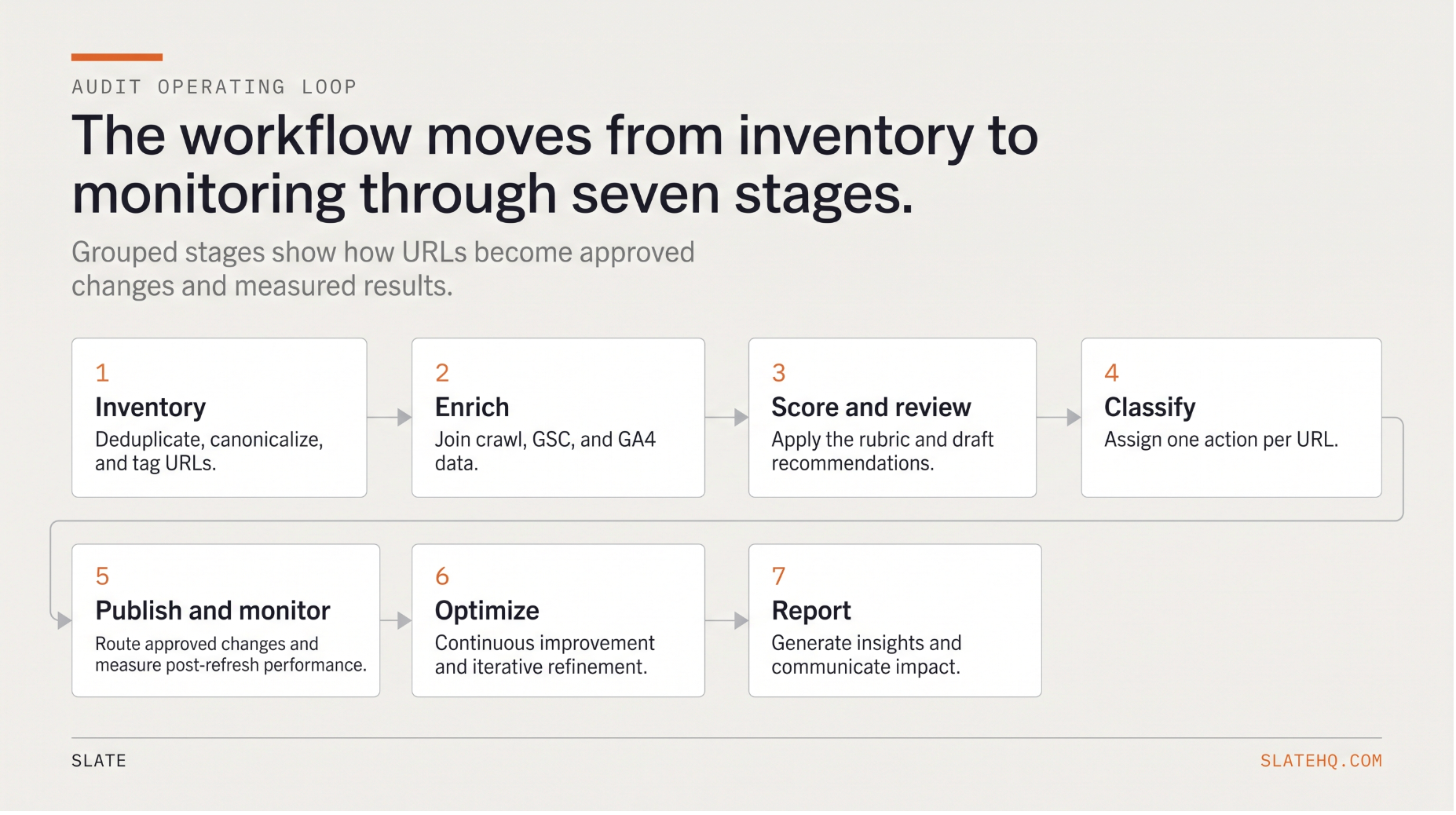
The workflow runs like this:
inventory → enrich → score → review → classify → publish → monitor
Each step needs inputs, automation, an output, and a decision rule.
Step 1: Build Your Content Inventory
What it does: Combines every URL source into one deduplicated master list.
Inputs: Sitemap export, CMS export, crawl output.
AI or automation: Deduplication, page-type tagging, and topic-cluster tagging.
Output: A master sheet with URL, page type, cluster, canonical status, and publish date.
Decision rule: A URL moves forward after it’s deduplicated, canonicalized, and tagged by type.
Start by merging your sitemap, CMS export, and crawl.
Then flag parameter URLs, duplicates, and canonical variants. You want to score the canonical page, not every messy version the crawler found in the basement.
A structured inventory is the backbone of any repeatable content audit checklist.
Step 2: Pull Crawl, Search, and Engagement Data
What it does: Adds technical and performance signals to each URL.
Inputs: Screaming Frog, Google Search Console, GA4.
AI or automation: Joins on normalized URL.
Output: An enriched inventory with performance and decay fields.
Decision rule: Any page with a clear organic decline gets flagged for review.
Join your crawl, GSC, and GA4 data on the canonical URL.
From GSC, pull clicks, CTR, impressions, and top queries. From GA4, pull sessions, engagement, and conversions. From the crawl, pull last-modified dates, canonicals, and duplication flags.
Trend is the useful signal here. A snapshot tells you where a page sits today. A trend shows decay before the page falls off a cliff.
Step 3: Create Your Scoring Rubric
What it does: Turns messy inputs into a comparable priority score.
Inputs: Enriched inventory from Step 2.
AI or automation: Weighted formula across URLs.
Output: Composite priority score per page.
Decision rule: Score page types separately.
This is where vague audits go to die.
Use a weighted rubric so “evaluate the content” becomes a score your team can defend. Adjust weights by business model, page type, and conversion path.
A conversion-led site should weight conversion value higher. A site with thin pages should give quality more weight.
For a deeper setup, pair this with a content scoring framework and a reusable website content audit template.
Step 4: Use AI to Audit Quality, Intent, and Topical Coverage
What it does: Reviews page quality, intent fit, and semantic gaps in batches.
Inputs: Page content plus rubric fields.
AI or automation: Page-level and cluster-level LLM prompts.
Output: Quality scores, gap notes, and draft recommendations.
Decision rule: Every AI recommendation stays in draft until a human checks accuracy and brand fit.
AI is good at spotting patterns across a lot of content. It can catch thin sections, stale claims, and pages that answer the wrong query.
It also hallucinates. Treat the output like a junior analyst’s notes: useful, fast, and still in need of review.
Example prompts given in the section below work best when paired with page data, query data, and human review.
Step 5: Audit AI Search Visibility and Retrievability
What it does: Checks whether your pages appear in AI answers and whether AI systems can cite them.
Inputs: Prompt map, AI platform tracking, crawl signals.
AI or automation: AI visibility tracking plus technical checks.
Output: AI visibility and retrievability scores by page or topic.
Decision rule: AI visibility belongs in the same scorecard as SEO metrics.
Rankings tell part of the story. You also need to know whether AI systems can find, trust, and cite your content.
Split the check into two parts.
AI visibility:
- Citation inclusion across ChatGPT, Google AI Overviews, Google AI Mode, Perplexity, Claude, and Gemini
- Prompt-level answer coverage for priority topics
- Brand mentions and sentiment in AI responses
- Competitor citations on the same prompts
AI retrievability:
- Indexable pages with snippet access allowed
- Core content in HTML, visible without login walls
- Clear 40-to-60-word answer blocks near relevant headings
- Structured data and strong entity coverage
Pages miss AI citations for familiar reasons: crawl issues, buried answers, weak author signals, or old claims.
Put those checks beside clicks and conversions so your audit reflects how people discover content now.
Step 6: Classify Each Page: Keep, Update, Consolidate, or Delete
What it does: Gives every URL one action.
Inputs: Composite score, AI visibility, duplication flags.
AI or automation: Threshold logic plus AI-drafted rationale.
Output: One action per URL with a short justification.
Decision rule: Every page gets classified.
Use thresholds so the action is defensible.
Update pages with value and stale information.
Consolidate pages fighting for the same intent. Pick the canonical winner, merge useful sections, and redirect the rest.
Delete or redirect pages with near-zero traffic, no conversions, no links, and no strategic role. The consolidate-or-delete call usually comes down to links and reusable content.
Map those calls into a content pruning workflow so the decisions reach production.
Step 7: Turn Recommendations Into a Repeatable Workflow
What it does: Converts decisions into assigned work, approved edits, publishing, and monitoring.
Inputs: Classified inventory with actions.
AI or automation: Task routing, CMS handoff, monitoring, and scheduled reruns.
Output: A living audit loop.
Decision rule: Nothing published without human approval.
The loop is simple:
inventory → enrich → score → review → classify → publish → monitor
Turn every recommendation into a task with an owner and due date. Route approved changes into WordPress or Webflow. Then measure post-refresh performance so you know whether the work paid off.
Human QA gate:
- AI drafts quality scores, gap notes, refresh recommendations, and first-pass rewrites.
- Humans approve strategy, factual accuracy, brand fit, and final publishing decisions.
This gate keeps automation useful instead of reckless. A recurring audit becomes a workflow your team can run whenever the site needs another pass.
That’s the base for how to do a content audit with AI.
Best Tools for Automating an AI Content Audit
A strong audit stack maps tools to workflow stages. If you want a broader comparison, our list of the best content refresh tools covers adjacent options.
1. Slate
Slate is an agent-driven content and SEO platform for the full audit loop: opportunity discovery, bulk auditing, recommendations, content creation, CMS publishing, measurement, and reruns.
Best for: SEO leaders, content ops teams, and organic-growth marketers auditing hundreds or thousands of URLs.
Where it fits: The entire workflow. Cowork and custom agents let teams delegate audit tasks in plain language or package a repeatable audit into a reusable agent.
Power Sheets handle bulk audits across thousands of URLs. Native Ahrefs and Semrush access brings keyword and backlink data into workflows. Pages combines Google Search Console and GA4 for clicks, CTR, and citations in one view.
AI Search Analytics tracks brand visibility across ChatGPT, Google AI Overviews, Google AI Mode, Perplexity, Claude, and Gemini. Direct publishing sends approved changes to Webflow or WordPress.
Pricing: Starting at $499/month for the Growth plan, which includes 15,000 credits, 10,000 AI answers per month, and 1,000 tracked pages. Scale is $999/month, Agency is $2,000/month, and Enterprise is custom.
G2 rating: 4.9/5
Book a demo: https://slatehq.com/book-a-demo
2. Screaming Frog
Screaming Frog’s SEO Spider is a desktop crawler for inventory and crawl data.
It pulls full URL lists, status codes, redirects, canonicals, and near-duplicate content. It also connects with Google Search Console and GA4.
Paid licenses add JavaScript rendering, scheduled crawls, and semantic similarity analysis for spotting thin or overlapping pages.
3. Google Search Console and GA4
GSC supplies clicks, CTR, impressions, and query data. GA4 supplies sessions, engagement, and conversions. Together, they anchor the performance side of your scoring rubric.
4. ChatGPT and Claude
ChatGPT and Claude handle the AI review layer. Use them to score pages against your rubric, find topical gaps, flag stale claims, and draft refresh recommendations. Keep structured prompts and human review in the loop.
5. Ahrefs and Semrush
Ahrefs and Semrush bring rankings, keyword data, and backlink profiles into the audit.
Slate includes native access to both inside workflows, so you can pull this data without leaving the audit process.
6. Airtable and Spreadsheets
A structured sheet can hold your rubric, composite scores, and action assignments.
It can also work as the queue for owners, due dates, and statuses.
For a broader stack, compare dedicated content audit tools.
Example Prompts and Templates
Use these prompts in ChatGPT or Claude. A human should edit the output before it becomes a final recommendation.
Page-level audit prompt:
Audit this page against the query "{query}".
Score from 1 to 10 on:
1. traffic relevance
2. intent match
3. topical completeness
4. quality
5. freshness
Return a rubric table and the four highest-priority repairs.
Content: {page_content}
Cluster-level topical gap prompt:
Given these {N} pages in the "{cluster}" cluster, review titles, H2s,
and target queries. Return a table with:
1. missing subtopics
2. cannibalization risks
3. best pillar candidate
4. merge or redirect candidates
Keep, update, consolidate, or delete prompt:
Using this page's metrics {traffic, conversions, trend, quality_score, duplication_flag}, recommend one action: keep, update, consolidate, or delete. Justify the recommendation in one sentence and cite the deciding factor.
Brand voice review prompt:
Check this draft against the brand voice below.
Flag off-tone sentences and rewrite only those. Preserve meaning.
Add no new claims.
Guidelines: {brand_voice}
Draft: {draft}
AI retrievability prompt:
Assess this page for AI answer-engine retrievability. Check for:
1. a clear 40-to-60-word answer near the top
2. structured headings
3. extractable lists or tables
4. snippet-suppression risks
List issues and recommended repairs.
Content: {page_content}
CSV column schema:
url, page_type, cluster, canonical_status, publish_date, last_modified, clicks, ctr, impressions, top_query, sessions, engagement, conversions, traffic_score, conversion_score, freshness_score, intent_score,
completeness_score, quality_score, internal_link_score, duplication_flag, ai_visibility_score, composite_score, recommended_action, owner, due_date, status
How to Measure Results After Your Audit
An audit earns its keep after the updates go live.
Track performance against pre-audit baselines, then feed the results into the next rerun.
Track:
- Organic clicks and CTR recovery on updated pages
- Ranking movement for target queries
- AI citation and mention changes
- Sentiment changes in AI responses
- Conversions and assisted conversions
- Topic gaps closed
- Pages consolidated, redirected, or deleted
Refresh depth counts. A Raptive analysis of 103,000 refreshes found that pages with more than a 10% word-count change averaged about 11% pageview growth. Light tweaks averaged about 2%.
Date changes and tiny edits rarely move the needle.
For cadence, run a light audit monthly and a deeper audit quarterly or twice yearly. High-change sites, like publishers and docs-heavy sites, need more frequent checks. A structured content refresh workflow keeps those reruns from slipping.
Automation case studies by Slate report that audit and reporting workflows can save 12 to 30 hours per week compared with manual processes. Treat that as directional, but the labor savings are hard to ignore.
Did You Know? Refresh results depend on depth. In aggregate data, light edits produced about 2% pageview growth, while updates crossing a 10% word-count change drove about 11%.
Common Mistakes to Avoid
A few errors wreck content audits fast.
- Auditing the whole site at once: Start with your top 100 URLs by business value, then expand.
- Trusting AI without QA: Hallucinations and false positives happen. Every recommendation needs human approval.
- Scoring only rankings: AI visibility belongs beside SEO metrics in 2026.
- Treating the audit as a one-time project: Without reruns, scores expire.
- Skipping owners and thresholds: Recommendations need owners, due dates, and action rules.
- Ignoring internal links and duplication: Cannibalization and thin pages drag down clusters.
Frequently Asked Questions
1. How do you do a content audit with AI?
Export URLs from your CMS, crawler, GSC, and GA4. Use AI to assess quality, freshness, intent match, and content gaps against page data. Score each page with a weighted rubric, assign a keep, update, consolidate, or delete action, then track results after changes go live.
2. What steps should be included in an AI content audit workflow?
Include goals, inventory building, data collection, scoring, AI quality review, AI visibility analysis, prioritization, action planning, human review, publishing, and monitoring. The sequence turns raw URLs into scored pages, then into approved changes you can measure.
3. What tools can automate a content audit?
Use Screaming Frog for crawling, GSC and GA4 for performance data, Ahrefs or Semrush for keyword and backlink data, spreadsheets for scoring, and AI models for page review. Slate can run the full workflow in one platform.
4. Can ChatGPT or Claude help with content auditing?
Yes. ChatGPT and Claude can summarize pages, score against a rubric, find topical gaps, flag stale claims, and draft recommendations. They work best with structured prompts, page data, and human review.
5. How often should you run an AI content audit?
Run a light audit monthly and a deeper audit quarterly or twice yearly. Large publishers, fast-moving industries, and documentation-heavy sites should check more often because content decay and AI visibility changes can show up quickly.
6. When should you update, consolidate, or delete content?
Update pages with value that have stale information. Consolidate pages that compete for the same intent. Delete or redirect obsolete pages with near-zero traffic, no conversions, no links, and no strategic role.
7. How do I run this workflow if I have 1,000+ URLs?
Use bulk sheets, batching, and automation. Batch the AI review, route pages into queues with owners and due dates, and use a platform to handle volume. Slate’s Power Sheets are built to audit thousands of URLs at once.